Help me about deleting contacts number in Lumia 532

Noman Shaam

New member
Apr 18, 2015
128
0
0
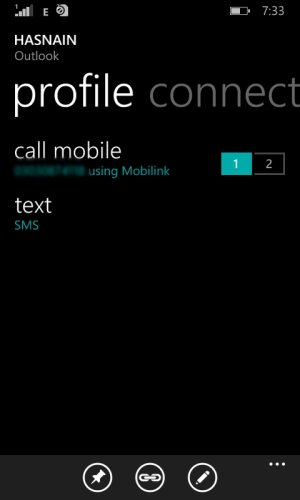
look in the pic there is a option of editing.... thanks again
 

Attachments

  • Fantasia Painting(7).jpg
    Fantasia Painting(7).jpg
    45.2 KB · Views: 2
Hello, and greetings!

In the People Hub, select any contact that you want to edit. In that contact's page, you should see three icons at the bottom - the right most icon should look like an inclined pencil. Tapping on the three dots ("ellipsis") reveals that the pencil icon is the edit button. After tapping on the edit icon, you will be brought to a page where you can choose which details to edit, add or remove.
 
Only contacts that are saved in/synced to your default Microsoft account can be edited. As indicated by alinauman97, this is usually the Outlook account.

Did you tap on the "edit" button? After tapping on that, you should either be prompted to edit the outlook contact or create a linked outlook contact for the person in case the contact is not yet in the outlook list (e.g. Facebook or Twitter only).

And how did you go to the pages indicated in the screenshots you uploaded? That doesn't look like my People Hub contacts page.
 
ok... but my problem is not solved yet

I can still remember the screenshots you posted, and I can see that it looks different from my contact's page in my phone. From my previous response to you, "how did you go to the pages indicated in the screenshots you uploaded? That doesn't look like my People Hub contacts page."
 
I can still remember the screenshots you posted, and I can see that it looks different from my contact's page in my phone. From my previous response to you, "how did you go to the pages indicated in the screenshots you uploaded? That doesn't look like my People Hub contacts page."


oh thanks... yes really it was not People Hub contacts... So it was unable to edit or delete.
thanks for tip.
 

Forum statistics

Threads
342,456
Messages
2,265,538
Members
428,869
Latest member
slpskat