Skype Account problem

Tribanj

New member
Jan 23, 2014
115
0
0
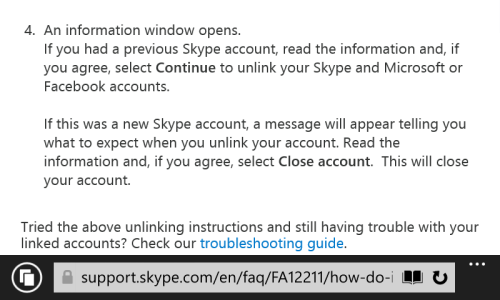
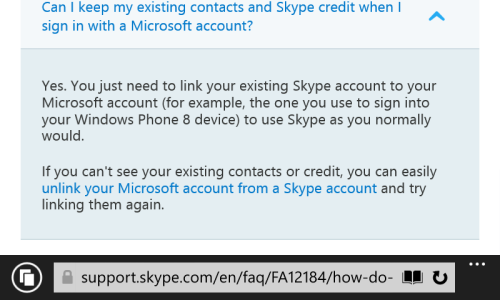
The problem is that now I can not get to my contacts on Skype which I had when I signed with Skype account. I tried a few tips from the Internet, but the problem remains the same. How with the Microsoft account, I can have all the contacts from Skype?

wp_ss_20140416_0004.png
wp_ss_20140416_0001.png wp_ss_20140416_0002.png wp_ss_20140416_0003.png
 
Last edited:
The problem is that now I can not get to my contacts on Skype which I had when I signed with Skype account. I tried a few tips from the Internet, but the problem remains the same. How with the Microsoft account, I can have all the contacts from Skype?
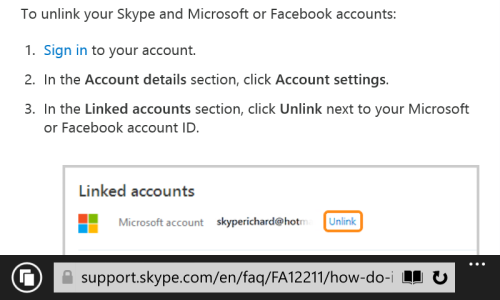
 
Does not anybody have a solution for this problem? How to use Skype Account on Skype or what I need do that with Microsoft Account I preserve Skype contacts?
 
Please follow the instruction on the below link.

https://support.skype.com/en/faq/FA...for-windows-desktop-with-my-microsoft-account

I was facing same problem and after use the step provide by the above link it work.
The step I did first login with Microsoft account and then I click the button "I have Skype account" and after that I provide my skype credential. Surprising it work in a single step. It restore all my contact history and skype credit into this. Now I am able to using the skype app on WP8.1 as well where there is no login option for skype.
 
Problem solved. I've had a problem on Skype on Windows 8.1 on PC. Your advice helped me. It now work. Thanks.
 

Trending Posts

Forum statistics

Threads
343,350
Messages
2,266,433
Members
428,907
Latest member
longinotti101