
When waiting for the new upgrade 8X?
- Thread starter pfg
- Start date
You are using an out of date browser. It may not display this or other websites correctly.
You should upgrade or use an alternative browser.
You should upgrade or use an alternative browser.

WanderingTraveler
New member
- Dec 23, 2012
- 4,974
- 0
- 0
What do you mean by "the new upgrade 8X?"
If you mean the 8X successor, chances are we'll see one at BUILD.
If you mean an upgrade to the 8X...chances are we won't see that.
If you mean the 8X successor, chances are we'll see one at BUILD.
If you mean an upgrade to the 8X...chances are we won't see that.

- Dec 16, 2012
- 42
- 0
- 0
What do you mean by "the new upgrade 8X?"
If you mean the 8X successor, chances are we'll see one at BUILD.
If you mean an upgrade to the 8X...chances are we won't see that.
I mean upgrading software.
WanderingTraveler
New member
- Dec 23, 2012
- 4,974
- 0
- 0
- Dec 16, 2012
- 42
- 0
- 0
Thanx .You should've received GDR3 by now, and WP8.1 hasn't been released, er, announced yet...
I ask because I can not I upgrade to GDR3.
When I try to upgrade my sent message:
"Downloading the update on my phone is normally but can not go in and update sent message:" Can not open (8007000d) "

juanitoriv
Windows 10 Champion
- Sep 1, 2012
- 1,333
- 0
- 0
- Dec 16, 2012
- 42
- 0
- 0
Use the Developer Preview method. Worked just fine for me.
How can I use the Developer Preview method?
juanitoriv
Windows 10 Champion
- Sep 1, 2012
- 1,333
- 0
- 0
First, go here http://dev.windowsphone.com/en-us/featured/update3 and register for a free App Studio account using your WP/Windows account info. Follow the instructions. After your registered, get this http://www.windowsphone.com/s?appid=178ac8a1-6519-4a0b-960c-038393741e96. Once the app is installed open it, login with the account info, enable preview then just go to Settings, Update. Let it do its do, and good to go.
Enjoy.
Enjoy.

juanitoriv
Windows 10 Champion
- Sep 1, 2012
- 1,333
- 0
- 0
- Dec 16, 2012
- 42
- 0
- 0
First, go here Windows Phone Dev Center and register for a free App Studio account using your WP/Windows account info. Follow the instructions. After your registered, get this Preview for Developers | Windows Phone Apps+Games Store (United States). Once the app is installed open it, login with the account info, enable preview then just go to Settings, Update. Let it do its do, and good to go.
Enjoy.
Thank you very much for your help, but the problem was not solved.
I think that will be solved with a new upgrade.
juanitoriv
Windows 10 Champion
- Sep 1, 2012
- 1,333
- 0
- 0
How did it not work? As above poster said, GDR2 IS a requirement for GDR3. The Dev Pre app is pretty clear about that. Do you not have 2?
- Dec 16, 2012
- 42
- 0
- 0
My phone has software version: 8.0.10327.77.How did it not work? As above poster said, GDR2 IS a requirement for GDR3. The Dev Pre app is pretty clear about that. Do you not have 2?

AnthonyWhoso
New member
- Jan 21, 2014
- 26
- 0
- 0
I've received my GDR3 update for the 8X a long time ago. It's the unlocked international version so maybe that's a possibility why you haven't seen your device update yet.
- Dec 16, 2012
- 42
- 0
- 0
I can not I upgrade to GDR3.I've received my GDR3 update for the 8X a long time ago. It's the unlocked international version so maybe that's a possibility why you haven't seen your device update yet.
When I try to upgrade my sent message:
"Downloading the update on my phone is normally but can not go in and update sent message:" Can not open (8007000d) "
AnthonyWhoso
New member
- Jan 21, 2014
- 26
- 0
- 0
I can not I upgrade to GDR3.
When I try to upgrade my sent message:
"Downloading the update on my phone is normally but can not go in and update sent message:" Can not open (8007000d) "
Are you trying to update through the developer preview?
AnthonyWhoso
New member
- Jan 21, 2014
- 26
- 0
- 0
I can not I upgrade to GDR3.
When I try to upgrade my sent message:
"Downloading the update on my phone is normally but can not go in and update sent message:" Can not open (8007000d) "
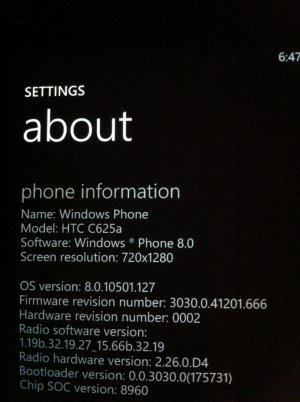
That's what you should be on. That's the latest update for the 8X
juanitoriv
Windows 10 Champion
- Sep 1, 2012
- 1,333
- 0
- 0
Per here
http://www.windowsphone.com/en-US/how-to/wp8/basics/windows-phone-8-update-history
You have GDR2. Are you following the steps as outlined? Are you doing this over WiFi or cell data, is it 2g, 3g, 4g or lte? Have you done a soft reset yet (power + vol down)?
What is your country/region/language/time zone set at? If those are incorrect, the downloads won't pull. Change them to US, US, English, Mountain, then soft reset. Try the update. If it doesn't pull, change back to where and when you are. Make sure the date is correct!!! Do a soft reset. Try again.
Good luck..
Keep us posted.
http://www.windowsphone.com/en-US/how-to/wp8/basics/windows-phone-8-update-history
You have GDR2. Are you following the steps as outlined? Are you doing this over WiFi or cell data, is it 2g, 3g, 4g or lte? Have you done a soft reset yet (power + vol down)?
What is your country/region/language/time zone set at? If those are incorrect, the downloads won't pull. Change them to US, US, English, Mountain, then soft reset. Try the update. If it doesn't pull, change back to where and when you are. Make sure the date is correct!!! Do a soft reset. Try again.
Good luck..
Keep us posted.
- Dec 16, 2012
- 42
- 0
- 0
Per here
Windows Phone 8 update history | Windows Phone How-to (United States)
You have GDR2. Are you following the steps as outlined? Are you doing this over WiFi or cell data, is it 2g, 3g, 4g or lte? Have you done a soft reset yet (power + vol down)?
What is your country/region/language/time zone set at? If those are incorrect, the downloads won't pull. Change them to US, US, English, Mountain, then soft reset. Try the update. If it doesn't pull, change back to where and when you are. Make sure the date is correct!!! Do a soft reset. Try again.
Good luck..
Keep us posted.
All these I have done many times.
I've done a soft reset and hard reset many times,
But I always have the message:
:" Can not open (8007000d) "
juanitoriv
Windows 10 Champion
- Sep 1, 2012
- 1,333
- 0
- 0
This is what I have. GDR3 dev preview. T-Mo branded 8X.
http://s182.photobucket.com/user/juanitoriv/media/temporary-10.png.html
We don't match. Hmmmmmm.
Similar threads
- Replies
- 1
- Views
- 8K

- Question
- Replies
- 0
- Views
- 13K

- Replies
- 0
- Views
- 1K
- Question
- Replies
- 1
- Views
- 8K

- Replies
- 0
- Views
- 3K
Trending Posts
-

-
 Windows 10 Themes no longer working...
- Started by DocCovington
- Replies: 6
Forum statistics

Space.com is part of Future plc, an international media group and leading digital publisher. Visit our corporate site.
© Future Publishing Limited Quay House, The Ambury, Bath BA1 1UA. All rights reserved. England and Wales company registration number 2008885.
 Facebook
 Twitter
 Instagram