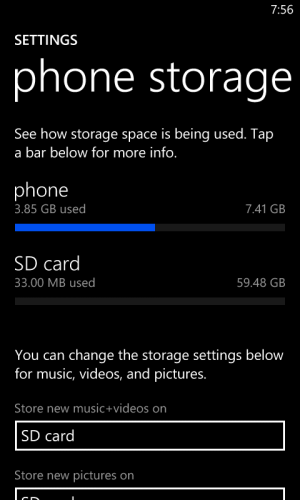
64GB microSDXC confirmed

gfiz

New member
Sep 23, 2012
40
0
0
In case any of you were still wondering considering the various amounts of conflicting literature out there over the past few weeks, I can confirm that at the very least, a class 10 64GB SanDisk microSDXC is functioning perfectly with my 810...and it is very fast (no camera lag as I read might be occurring in another post)

wp_ss_20121119_0001.png
 
That is absolutely awesome! Thanks for confirming this. :D I'm adding loads of music to my 32GB card on my new 810 as we speak! :P
 
Thanks, ordered a class 10 SanDisk microSD for all my music and photos, looking forward to all of that storage! Glad to actually get real-world confirmation!
 
I caught that Bestbuy sale also, my L810 should be here Friday and I'll be 64GB ready! Thanks!
 
I can also confirm that it works, but I am having a pretty serious problem and wonder if it is a card problem or a phone problem. Specifically, if I am saving to the card and do anything else with the phone, I hacpve some very stern agree behavior. It will get stuck in the save process. I will then not be able to get to my settings screen. To fix things, I need to pull the battery, pull out the memory card, stick the memory card into my computer and scan/fix it before putting it back into the phone. If I don't scan/fix it first, the phone will work fine but won't see the card. It is a sandisk 64 class 10 card. Card problem? Or phone problem?
 
That sounds like a card problem. I've had similar experiences with cards before. I'd try re-formatting the card with the phone. If that doesn't work, I'd RMA.
 
Thanks. I'll try the reformat and see if that fixes it. IMF not, it's back to Amazon with that silly card. It's driving me nuts! At least I've gotten pretty good at popping the back cover off LOL.


update: a reformat in the phone didn't work Netherlands phone is still framing/ crashing with the memory card. I plan on picking up a small card today and testing it out before sending this one back, just to make sure it's not a problem with the phone.

update 2: tried a different card and it works fine - no more lockups! The original 64gb card is headed back to Amazon.
 
Last edited:
That's the one I used, and have returned as defective for exchanger, but sadly, it was not on as much of a sale when I bought it:(
 
FYI, you can use a Class 4 micro SD, but it's painfully slow for writing photos and video. Also, I occasionally get an error when trying to read an MP3 (usually the first MP3 in a playlist, but subsequent files open fine, or if I hit the back button it will play).

I'm going to wait till blackFriday or cyberMonday to place an order for the SanDisk 64gb microSD. Hopefully there will be a deal, but I always wonder which day will have the better prices (blackFriday or cyberMonday).
 
Has anyone downloaded any Nokia maps to their phone? Can maps be saved to the microSD card? I'm using Nokia Maps version 3.0.113.8
 
Has anyone downloaded any Nokia maps to their phone? Can maps be saved to the microSD card? I'm using Nokia Maps version 3.0.113.8

Maps are saved in the main phone memory only as far as I can tell. Which on the 810 kinda sucks since you only get 8GB to play with. I initially downloaded the whole U.S. map set @ 2.5GB but then deleted it and only downloaded a few individual states to save space. On the other hand, I have a 64GB SD card which I've already got 20GB of music on...so I'll take that trade-off any day.
 
Arrrghhh. I received my 64GB SanDisk (SDSDQUA-064G-A11A) and it doesn't work properly. Yes, the phone sees the card, I can read/write to the card, but the card is to slow.

How to duplicate: Record a video to the card, 20 seconds of moving the phone around so it's not a static picture. Then replay the video, it stutters, stalls, and sometimes just quits before the end of the 20 seconds (720p or 1080p). I did a "quick" and "long" format of the card (exFAT), no go. Formatted the card with the phone, no go. I even deleted and recreated the partition on the card, again doing a "quick" and "long" format, no go.

To verify that it's the write speed was the issue, I did copy the video off the phone and played it on my computer (which is more than powerful enough to play 1080p video). The playback was identical to the phone playback, hence the phone couldn't write the file properly.

I even went back to the Microsoft store to see if they could help diagnose it. They were EXTREMELY helpful, they pulled out another phone from stock and we tested the SD card on it, same issue. They even pulled a SD card (32GB Kingston) off the shelf and we tested it in both phones, then it worked.

So I would HIGHLY recommend that as soon as you get an SD card, the first thing to do is try recording video to the SD card in both 720p and 1080p. Make sure playback is smooth and without any issues (report back here if you can).

Now I get to return the SD card :(
 

Members online

No members online now.

Forum statistics

Threads
341,223
Messages
2,264,290
Members
428,833
Latest member
jensendickens