Auto-correct can't correct 1 wrong letter?

danj210

Member
Jul 27, 2011
267
0
16
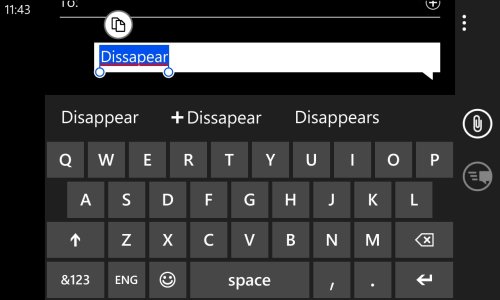
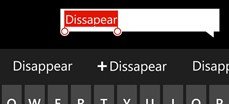
Hey all, I need someone to help me test this so I know if it's my phone or not and if I need to reset the auto-correct. But if you type the word "Dissapear" or "disapear" which both are wrong, it wont suggest the correct word or any word at all. It will show the red squiggly underlines but when you tap them it only gives the option to add the word with still no other suggestions. Can anyone else produce the same results? Happened to me on one or two words before this one.

Thanks for the help in advance!
 
Hey all, I need someone to help me test this so I know if it's my phone or not and if I need to reset the auto-correct. But if you type the word "Dissapear" or "disapear" which both are wrong, it wont suggest the correct word or any word at all. It will show the red squiggly underlines but when you tap them it only gives the option to add the word with still no other suggestions. Can anyone else produce the same results? Happened to me on one or two words before this one.

Thanks for the help in advance!

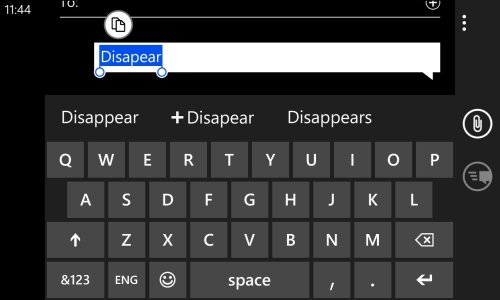
Both the words show up correctly for me. What language settings are you using? I'm on English (India).


wp_ss_20130702_0001.jpgwp_ss_20130702_0002.jpg
 
It works on my en-US keyboard... I would venture to guess that at some point you may have accidentally spelled it wrong, then when autocorrect came up, instead of tapping the correct spelling, you tapped the one with the plus sign. That would add the misspelling to the dictionary, and never again will it question the misspelling. AFAIK the only way to fix that would be to reset the dictionary.
disappear.jpg
 
But if that were the case then there would be no squiggly line to indicate the word is wrong or the option to add it again.
 
Hey all, I need someone to help me test this so I know if it's my phone or not and if I need to reset the auto-correct. But if you type the word "Dissapear" or "disapear" which both are wrong, it wont suggest the correct word or any word at all. It will show the red squiggly underlines but when you tap them it only gives the option to add the word with still no other suggestions. Can anyone else produce the same results? Happened to me on one or two words before this one.

Thanks for the help in advance!

When i typed your second example it auto corrected to disappear. The first one came with the squiggly line and when I tapped it, it gave me the option for disappear.
 
Have u checked the settings of your English keyboard? Are the options to suggest text and correct misspelt words selected?
 
Have u checked the settings of your English keyboard? Are the options to suggest text and correct misspelt words selected?


Yes I did and everything was right. This has always worked just fine and then I subtly started noticing words that I KNEW were wrong or they had squiggly lines with no suggestions, I figured it was time to try resetting keyboard stuff. So that's what I did and so fair it will correct all iterations of disappear just fine.

I wanted to at least bring this up in case these reports are very rare, that way now it's documented and there is an easy possible solution! You can always re-add all you words later on as you go so it's no trouble.

Thanks everyone for the awesome help, this is a great community! :)
 
Sorry to bring this thread up again but about a month ago I reset my suggestions for my keyboard and started to notice the same issue where my phone wasn't suggesting a correct spelling for words that were clearly incorrect.

For example, I would type "toniht" instead of "tonight" but there would be no correct spelling offered for it. Even tapping on the word would pop up "+toniht" but no other alternative. Luckily I came across this thread and resetting the keyboard again fixed the problem but it does seem like a strange and rare issue that occurs. I've been using Windows Phone since 2011 and this is the first time I have encountered this.

So I guess I'm just here to be the 2nd one to acknowledge that this issue can happen.
 

Trending Posts

Forum statistics

Threads
343,308
Messages
2,266,391
Members
428,905
Latest member
enatega3234