Got Update but not Cortana

Kglacal

New member
Feb 2, 2015
8
0
0
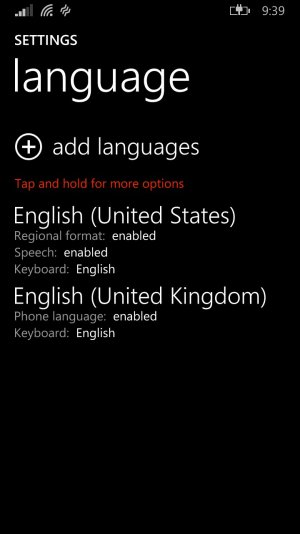
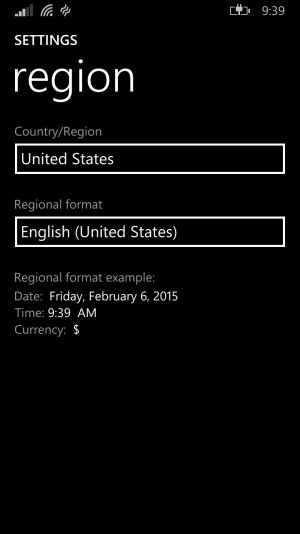
My keyboard and language is set to English. Now my Region is United States, English (United States) but it still reads, "I'm afraid I'm not available to help in your region with the language you've chosen.".
 
you should change your language to English (United States).

There are also:
English (United Kingdom)
English (Australia)
English (Belize)
English (Canada)
English (Caribbean)
English (Hong Kong SAR)
English (India)
English (Ireland)
English (Jamaica)
English (Malaysia)
English (New Zealand)
English (Philippines)
English (Singapore)
English (South Africa)
English (Trinidad and Tobago)
English (Zimbabwe)

Make sure you've chosen the correct one. (US)
 
Last edited:
are you sure there's:
?No Cortana on the app list?
?No Cortana in phone settings?
?No Cortana when you press and hold search button?
 
Last edited:
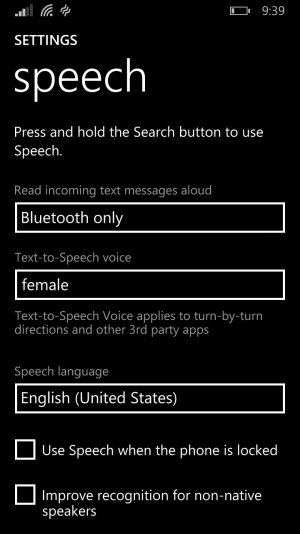
I just got the update here in Canada, but was bummed out that Cortana wouldn't work with the US region in place. Accidentally I selected region as UK with English US and speech as English UK and got Cortana to work albeit the UK version. Couldn't get the US Cortana to work. Hope this helps you!
 
Yes I have Cortana but its not working. I have change everything to the appropriate settings. (Look at Pictures)
 
same with me
i think its see the carrier you are using
if you are not in saudi arabia , then you are not supported
or , its sees your microsoft region account
you can change the region every 6 month
 

Trending Posts

Forum statistics

Threads
342,517
Messages
2,265,599
Members
428,871
Latest member
breadcat