Horrible camera performance in low-light conditions and indoors

LumiaWorld

New member
May 31, 2013
331
0
0
Ever since I updated my phone to GDR2, my 520 has been producing horrible pictures in low-light conditions and indoors.

I always get grainy, blurry pictures. Also, most of the time the colors on the pictures are inaccurate.

My 520's camera was better when it was still on GDR1...

Anyone else having the same problem?

BTW, sorry for my English.
 
Its not the greatest at low light to begin with and you don't buy that phone for its ability to snap great photos anyway. Sorry about the problems you are having.
 
Every Lumia 520, 720 after amber update takes horrible pictures in low light, because it is set to use high sensitivity values(ISO). When sensitivity increases automatically noise in the image also increases.

Use Nokia Camera ( formerly known as Nokia Pro Cam) for best pictures by using manual controls. Install it by using proxy trick or wait until Lumia Black update arrives. With Lumia Black update, Nokia camera will be available to all Lumias.
 
Ever since I updated my phone to GDR2, my 520 has been producing horrible pictures in low-light conditions and indoors.

I always get grainy, blurry pictures. Also, most of the time the colors on the pictures are inaccurate.

My 520's camera was better when it was still on GDR1...

Anyone else having the same problem?

BTW, sorry for my English.


Hey I recommend you to use Nokia Camera to get best low light and indoor photos, the built in camera app is worst. I almost forgot about the built in camera app after I have installed Nokia Pro Cam( now called Nokia Camera). Install it using proxy trick.

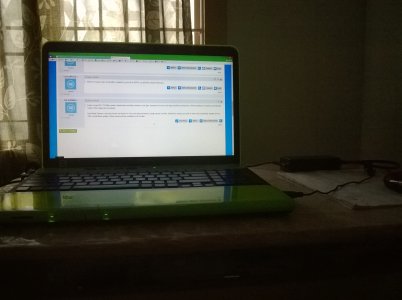
This photo is taken with built in camera app in my Lumia 520:
WP_20131208_002.jpg

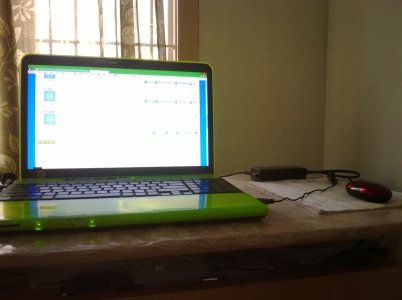
This photo is taken with Nokia Camera with ISO:100, Focus:Infinity, Shutter speed:1s:
WP_20131208_16_28_56_Pro.jpg

see the difference btw both photos, you will install Nokia Camera.
 
Hey I recommend you to use Nokia Camera to get best low light and indoor photos, the built in camera app is worst. I almost forgot about the built in camera app after I have installed Nokia Pro Cam( now called Nokia Camera). Install it using proxy trick.

This photo is taken with built in camera app in my Lumia 520:
View attachment 51563

This photo is taken with Nokia Camera with ISO:100, Focus:Infinity, Shutter speed:1s:
View attachment 51564

see the difference btw both photos, you will install Nokia Camera.

I can see the difference in your pictures. Clearly the darker areas are now more viewable by using Nokia Camera. However the trade off is that your highlights are now overblown. I mean if you look at the curtain and your laptop screen, the majority of the 'detail' is gone! . Yes the picture is brighter, and colours have come in to view, but at the cost of 'detail'. I mean just look at the pattern in the curtain!
I think the first picture is more natural and detailed but dark. Playing around with GDR1 iso and lighting settings could have corrected it to make it brighter without overblowing the highlights.. Of course, that is my subjective 2 cents.
Roll on Janaury.....I hope GDR3 and Black fw fix these issues with GDR2
 
I can see the difference in your pictures. Clearly the darker areas are now more viewable by using Nokia Camera. However the trade off is that your highlights are now overblown. I mean if you look at the curtain and your laptop screen, the majority of the 'detail' is gone! . Yes the picture is brighter, and colours have come in to view, but at the cost of 'detail'. I mean just look at the pattern in the curtain!
I think the first picture is more natural and detailed but dark. Playing around with GDR1 iso and lighting settings could have corrected it to make it brighter without overblowing the highlights.. Of course, that is my subjective 2 cents.
Roll on Janaury.....I hope GDR3 and Black fw fix these issues with GDR2


Yes I agree, but GDR1 camera performance quite impressive than GDR2., any way Lumia 520 has no back-side illuminated sensor for balancing darker, and brighter parts of the image., neither it has carl ziess lens for capturing high details, but I say Nokia Camera is far better than built in camera app. When zoomed to 100%, the images taken with built in camera app has more amount of noise, than those taken with Nokia Camera with manual settings. ISO makes all the noise in the images. Low ISO makes image darker, but less noisy. Increasing shutter time will make brighter part of image loose details.
 
Yes I agree, but GDR1 camera performance quite impressive than GDR2., any way Lumia 520 has no back-side illuminated sensor for balancing darker, and brighter parts of the image., neither it has carl ziess lens for capturing high details, but I say Nokia Camera is far better than built in camera app. When zoomed to 100%, the images taken with built in camera app has more amount of noise, than those taken with Nokia Camera with manual settings. ISO makes all the noise in the images. Low ISO makes image darker, but less noisy. Increasing shutter time will make brighter part of image loose details.

I agree with you, overall, Nokia Cam app is better in certain situations. However, the app seems to behave differently on different models, 520, 720 etc. Hopefully , these nuances will be ironed out, or improved with the next update. Enjoy! It is great to see we are all seeking the best possible outcomes.
 
Been using the Nokia Camera app for one day...

It has been an AMAZING experience so far. It's one of Nokia's finest apps. 👍👍👍😃😃
 
Been using the Nokia Camera app for one day...

It has been an AMAZING experience so far. It's one of Nokia's finest apps. ����������

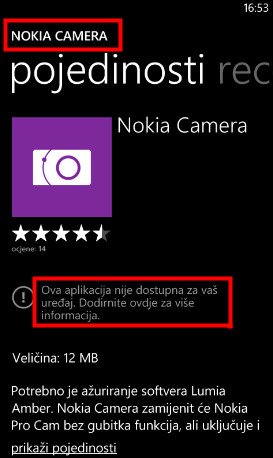
I can't install Nokia Camera. I got next notification : "This application is not available for your device."

Snap1.jpg
 
The Nokia Camera app is only available for the 92X phones, the 1020 and the 1520 at the moment.

But since we have some genius Windows Phone users in here, we, the 52X, 62X, 72X, and 82X users, can now get the app! :)

Here are the instructions...

1. Go to Settings.
2. Go to Wi-Fi.
3. Connect on your Wi-Fi. Tap on your Wi-Fi connection. Turn on the proxy.
4. Place the ff. below the proxy:
Server/URL: 117.135.139.179
Port: 8888
Then, tap the check button on the bottom part of your screen.
5. Go to the Store. Search for the Nokia Camera app.
6. Install. You are done!

NOTE: If your download doesn't work (Attention required, tap here) do the following:

1. Turn off the Proxy.
2. Turn off the Wi-Fi.
3. Turn on the Wi-Fi. (Do not turn on the proxy)
4. Resume your download.

(I'm not 100% sure on this part... But in my case, it worked.)

:)
 
The Nokia Camera app is only available for the 92X phones, the 1020 and the 1520 at the moment.

But since we have some genius Windows Phone users in here, we, the 52X, 62X, 72X, and 82X users, can now get the app! :)

Here are the instructions...

1. Go to Settings.
2. Go to Wi-Fi.
3. Connect on your Wi-Fi. Tap on your Wi-Fi connection. Turn on the proxy.
4. Place the ff. below the proxy:
Server/URL: 117.135.139.179
Port: 8888
Then, tap the check button on the bottom part of your screen.
5. Go to the Store. Search for the Nokia Camera app.
6. Install. You are done!

NOTE: If your download doesn't work (Attention required, tap here) do the following:

1. Turn off the Proxy.
2. Turn off the Wi-Fi.
3. Turn on the Wi-Fi. (Do not turn on the proxy)
4. Resume your download.

(I'm not 100% sure on this part... But in my case, it worked.)

:)

I tried this, but I can't install this. Nokia Camera not have in Store. I have it in SysApp Pusher. I know for Nokia Camera Beta, but I lake Nokia Camera.
 

Trending Posts

Members online

No members online now.

Forum statistics

Threads
341,675
Messages
2,264,747
Members
428,838
Latest member
DocCovington