
How fast is card I/O on the 720?
- Thread starter shlomo80
- Start date
You are using an out of date browser. It may not display this or other websites correctly.
You should upgrade or use an alternative browser.
You should upgrade or use an alternative browser.

OzRob
New member
- Mar 20, 2013
- 604
- 0
- 0
Using a fast Class 10 card, what's the throughput for read and (especially) write?
Maximum speed will depend on the card, not the phone. Minimum read and write speed will be 10MB/s (that's what Class 10 means).
OzRob
New member
- Mar 20, 2013
- 604
- 0
- 0
Yes, I want to know what the achievable speeds are. On some handsets it's more card limited than phone limited. On others it's more phone limited than card limited.
Fair 'nuff. But can I ask why you want to know? 10MB/s is more than enough to stream HD video, and that's about the most demanding thing you can do on an SD card at the moment given that WP8 doesn't let you store apps, app data or anything much else on the card.

- Aug 22, 2011
- 93
- 0
- 0
Fair 'nuff. But can I ask why you want to know? 10MB/s is more than enough to stream HD video, and that's about the most demanding thing you can do on an SD card at the moment given that WP8 doesn't let you store apps, app data or anything much else on the card.
It's more about how fast I can swap data.

Yipcanjo
New member
- Jul 29, 2011
- 62
- 0
- 0
Sadly, using an SD card on the Lumia 720 (or the 820, since I've owned both) adversely affects performance of the phone in odd ways. The Music Hub is strangely sluggish, and then usually suffers from showing multiple versions of the same songs -- sometimes 5 or 6 times. The Camera is slow to take your first photo, even when you've set the Camera to store photos in the Phone Storage (not External Storage). Even opening the Settings menu is noticeably slower -- just by having a microSD card installed. Yes, I've tested a couple of Class10 cards, a Class4, and a Class2. Same behavior on all.
Microsoft really needs to fix these issues.
Microsoft really needs to fix these issues.
Yipcanjo
New member
- Jul 29, 2011
- 62
- 0
- 0
Yipcanjo, what brand and capacities are these cards and do you recall how they were formatted?
Thanks
64GB Class10 Kingston
32GB Class10 SanDisk
2GB Class4 Toshiba
512MB Class2 ???? (just for testing)
I formatted with the phone initially, and then with Windows and placed into the phone later. Didn't matter -- same issues either way.
The problem appears to be with WP8 itself, and not really the speed of the microSD cards.
OzRob
New member
- Mar 20, 2013
- 604
- 0
- 0
It's more about how fast I can swap data.
Sorry, I'm still not understanding. What data can you 'swap'? Are you trying to develop an app?
- Aug 22, 2011
- 93
- 0
- 0
Sadly, using an SD card on the Lumia 720 (or the 820, since I've owned both) adversely affects performance of the phone in odd ways. The Music Hub is strangely sluggish, and then usually suffers from showing multiple versions of the same songs -- sometimes 5 or 6 times. The Camera is slow to take your first photo, even when you've set the Camera to store photos in the Phone Storage (not External Storage). Even opening the Settings menu is noticeably slower -- just by having a microSD card installed. Yes, I've tested a couple of Class10 cards, a Class4, and a Class2. Same behavior on all.
Microsoft really needs to fix these issues.

As a matter of curiosity have you run say ATTO or CrystalDiskMark on any of those cards?
Well, I've purchased a 64 GB Samsung MicroSDXC (Class 10) - last week - which turned up today, so I'll let you guys know how that works out. Only problem is that I STILL have not received my 720 :-( .... But if anyone wants to know anything about the card in advance, just ask.
- Aug 22, 2011
- 93
- 0
- 0
Well, I've purchased a 64 GB Samsung MicroSDXC (Class 10) - last week - which turned up today, so I'll let you guys know how that works out. Only problem is that I STILL have not received my 720 :-( .... But if anyone wants to know anything about the card in advance, just ask.
If you can run ATTO or CrystalDiskmark on a PC with a decent card reader it'd be good - that would give is a baseline point of how fast it can accept data.
I FINALLY got the chance to perform the benchmarks you asked for. Ironically, I only had a USB-SDcard reader which performed very poorly. At work I have a L520 thinkpad with an embedded SD Card reader (from Realtek) on a PCI-e bus. Here's the results with the Samsung 64 GB microsdxc:If you can run ATTO or CrystalDiskmark on a PC with a decent card reader it'd be good - that would give is a baseline point of how fast it can accept data.
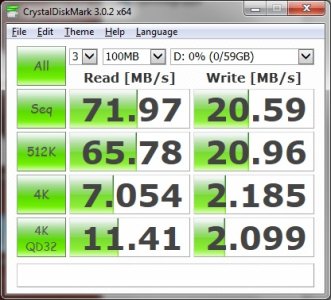
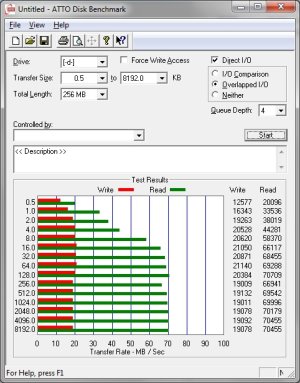
Now the next question arises - now that I've got the 720: What app can test the throughput?
That being said. I see absolutely no sluggishness (yet) with the 64 GB card installed - getting to the Settings menu and entering it feels just as fast. Photos are snapped as fast as without an SD card. Don't know what to say. I've got no further apps installed other than AE Bowling 3D.
That being said. I see absolutely no sluggishness (yet) with the 64 GB card installed - getting to the Settings menu and entering it feels just as fast. Photos are snapped as fast as without an SD card. Don't know what to say. I've got no further apps installed other than AE Bowling 3D.
- Aug 22, 2011
- 93
- 0
- 0
I finally received my 620 and 720 today, been playing around with them - and I have to say the transfer speeds aren't as bad as I'd feared. It's actually syncing from j.River Media Center faster than the Xperia Z did with the same card, which is pretty stunning (especially as it's an MTP vs UMS comparison - MTP is usually slower given the need to process metadata after each file).
Similar threads
- Replies
- 1
- Views
- 19K

- Question
- Replies
- 1
- Views
- 8K


- Replies
- 4
- Views
- 2K

- Replies
- 0
- Views
- 2K
Trending Posts
-

-
 Windows 10 Themes no longer working...
- Started by DocCovington
- Replies: 6
Forum statistics

Space.com is part of Future plc, an international media group and leading digital publisher. Visit our corporate site.
© Future Publishing Limited Quay House, The Ambury, Bath BA1 1UA. All rights reserved. England and Wales company registration number 2008885.
 Facebook
 Twitter
 Instagram