
I love my Nokia 520 but the sync of calendar is driving me maaaaad!!

The Salad

New member
Jan 16, 2014
22
0
0
I do like my new Nokia phone and I'm getting to grips with it but for the life of me I can't work out how to properly sync the phone, with Outlook.com and with my Microsoft Outlook on my PC (I have BTinternet.com email accounts here). This is what my calendar looks like in Outlook on my PC, I've got at least three different calndars. What am I doing wrong . . . .pleeease.
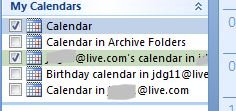
Cal 1.JPG
 
Have you got all the accounts on your phone or have you linked the three together to your main MS acocunt on Outlook.com?

If you have all the accounts on your phone ensure that you're syncing the calendar.

Settings -> email + accounts -> select account -> contents to sync -> checkbox next to calendar

In calendar app

... -> Settings -> turn on/off whatever you want

If you have linked the Calendars in Outlook.com you must make sure that the account that you linked to is on your phone and what I put above is done. If it's your main MS Account then you don't need to worry as it will sync regardless.

Sometimes things need a bit of push on WP.

Go to Settings -> email + accounts -> long press on the account you want to sync -> press sync in the pop up
 
Thanks for reply. V strange . . . .hmmm . . . when I go to Settings -> email + accounts -> select account -> contents to sync -> checkbox next to calendar as you instructed, against by btinternet.com email accounts there is no calendar checkbox . . . . . . ?
 
As I mentioned, if it's your main MS account the calendar checkbox won't be there. Did you receive emails ok?
 

Trending Posts

Forum statistics

Threads
343,552
Messages
2,266,640
Members
428,915
Latest member
josie_raye23
