Lumia 1520 & Monster Controltalk

jtanigawa

New member
May 13, 2013
46
0
0
Has anyone with a 1520 tried to test if Monster Headphones with controltalk that aren't Nokia branded work?
 
Are your headphones designed for iPhones or Androids? Typically anything designed for iOS does not work properly on anything other than iDevices.
 
I think it is designed for iPhones. Is this a software issue that Microsoft can solve via an update or does it involve specific hardware on the device?
 
I don't understand why a standard Monster headphone won't work with this Lumia. Anyhow, Urbanears do sell their headphones with a "Nokia Lumia Adaptor."
 
I don't understand why a standard Monster headphone won't work with this Lumia. Anyhow, Urbanears do sell their headphones with a "Nokia Lumia Adaptor."

Was just looking at the Urbanears website and don't see anything about a Nokia Lumia Adaptor. Where is that info from?
 
I recommend going to Best Buy or another retail store that sells the headphones you like and actually trying them with your phone. The control functions on headphones designed for iPhone will not with Windows phones but sometimes the Android headphones will. I have the Nokia Purity Pro by Monster headphones and ear buds, which work perfectly with the 1520, and I'm happy with them. Don't forget your 1520 has an equalizer so you can adjust the audio to best match both your headphones and your personal taste.
 
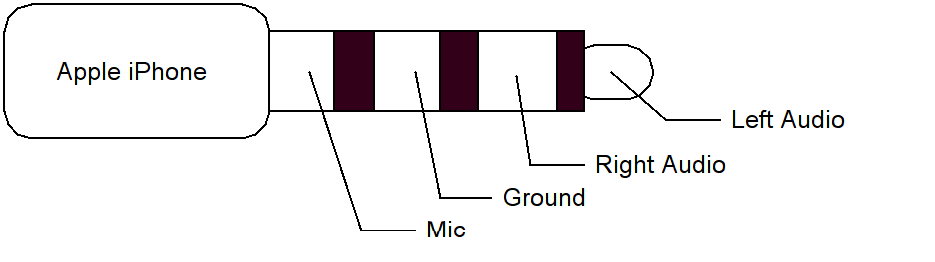
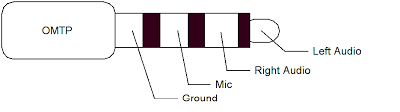
It's because not everyone can agree on a standard for the 4-pin 3.5mm headphone.

iphoneaudio.png
omtpaudio.png

So in general, look at the box your headphones come with. If you find a label with something like "Make for iPhone/iPod" or "Made for Apple", The controls will work on anything non-Apple.
 
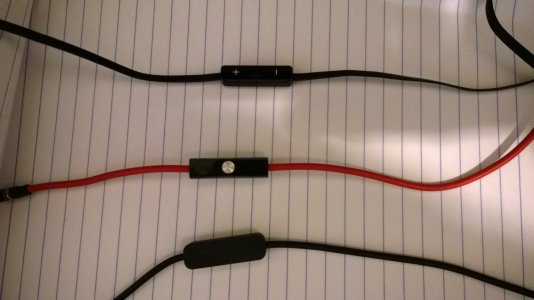
Just for kicks I tested three different Monster cables that I have from various sources. In pictures, top is from the Nokia Purity On-ear headphones, middle from the Dr Dre Beats Solo, bottom from the Dr Dre Beats Studio:
WP_20131209_15_10_49_Pro.jpg

Results:

The Nokia set is a three button controller, and works with every Windows Phone I've owned, as it should. Buttons don't work on my iPod shuffle.

The red three button Dr Dre cable from the Solo headset doesn't work on my 1520 at all. Only sound. None of the buttons work: volume, pause/play/next/previous. It does work with my iPod Shuffle, as expected.

The black single button cable from the Studio headset works perfectly on my 1520. Being a single button controller, it doesn't have volume, but pause/play worked, as did holding the button and using voice commands. Buttons don't work on my iPod Shuffle.
 
Was just looking at the Urbanears website and don't see anything about a Nokia Lumia Adaptor. Where is that info from?

From the two Urbanears I have/had. Tanto (still have) and Medis (returned)

Both works on my Lumia 610, Xperia V, HTC 8S and every i device i own.

Single button controlled pause, next and previous track. I didn't use the supplied adaptor.

Sent from my LT25i using Tapatalk 4
 
Does anyone here use proper headphones, etc. like the audio technica m50's. The more high end headphones don't have controls on the audio cable.
 
Define proper headphones...

High-end headphones are not supposed to be driven by a phone.

I have tried the Focal, B&W, AT, Beyerdynamic, Harman Kardon, etc. and a few of them are sensitive enough for use but they may not shine.

Sent from my Windows Phone 8S by HTC using Tapatalk
 

Members online

No members online now.

Forum statistics

Threads
341,304
Messages
2,264,371
Members
428,833
Latest member
Rahashaha