
- Jan 11, 2013
- 2
- 0
- 0
I feel that keyboard on lumia 920 along with the suggestion bar consumes a lot more space than it should and thus hampers the experience. Is there any way to disable or remove that bar from appearing on the screen?
When I use IM+ or whatsapp, this bar is always there.
Also, I can only see one message when that bar is there. While using whatsapp on iphone 4, even in landscape mode, there is more space and I can see more that one message.
This is utter waste of a 4.5 inch screen.
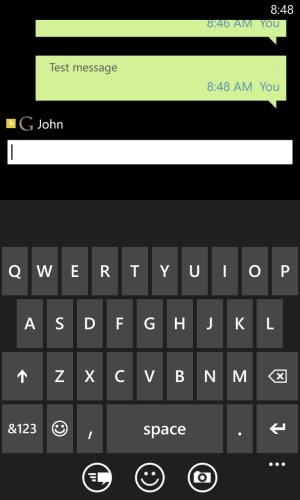
When I use IM+ or whatsapp, this bar is always there.
Also, I can only see one message when that bar is there. While using whatsapp on iphone 4, even in landscape mode, there is more space and I can see more that one message.
This is utter waste of a 4.5 inch screen.



 Facebook
 Twitter
 Instagram