

- Apr 8, 2013
- 5
- 0
- 0
Hey there,
I've got an Issue with the Picture App on my Lumia 920.
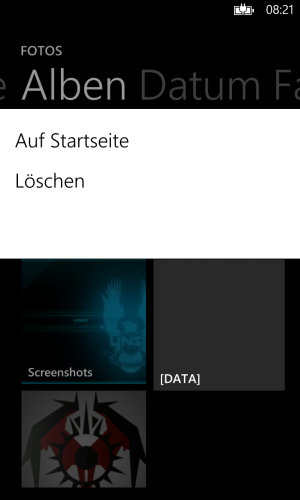
When you open it, there's the List of your recent taken Photos, Albums, Date and Contacts. When selecting Albums, there are a few Tiles.
[Just so you know what I'm talking about.]
What I did do:
I used to make a Folder on the Root Directory of the Phone for all kinds of Stuff. Just like Mass Storage, ya know, which I used as some kind of a Memory Stick.
This Folder's Name is "[DATA]", so it will be located on Top of all the other Folders. I've been doing this for quite some Time with other Devices yet, without any Problems. So I did with the Lumia, as well. Until now.
Because lately, I put a Folder in there for Transfer to another PC, which... happened to contain a Picture somewhere within its Structure.
The Picture App found it, and displayed it in its Album Screen. So, there was an Album which was called [DATA], containing all the Folders leading to the Picture.
Now, here's the Problem:
After transferring, I removed the Content of the Folder via USB, and the Picture's gone... but the Album is still there.
There is an empty, gray Album called [DATA] in the Picture App. And I just can't get rid of it.
I tired creating a new one and deleting it again, and renaming the Folder on the Storage via USB. Which didn't remove the Album.
I tried deleting the Album from within the App. It faded away, but upon swiping out and back in, it was still there.
I tried restarting the Phone. And guess what? It's still there. Right now.
I can't remove this empty, non-existent Album. I guess it's because its Name contains the [ and ], somehow.
How do I get rid of it, now...?
I've got an Issue with the Picture App on my Lumia 920.
When you open it, there's the List of your recent taken Photos, Albums, Date and Contacts. When selecting Albums, there are a few Tiles.
[Just so you know what I'm talking about.]
What I did do:
I used to make a Folder on the Root Directory of the Phone for all kinds of Stuff. Just like Mass Storage, ya know, which I used as some kind of a Memory Stick.
This Folder's Name is "[DATA]", so it will be located on Top of all the other Folders. I've been doing this for quite some Time with other Devices yet, without any Problems. So I did with the Lumia, as well. Until now.
Because lately, I put a Folder in there for Transfer to another PC, which... happened to contain a Picture somewhere within its Structure.
The Picture App found it, and displayed it in its Album Screen. So, there was an Album which was called [DATA], containing all the Folders leading to the Picture.
Now, here's the Problem:
After transferring, I removed the Content of the Folder via USB, and the Picture's gone... but the Album is still there.
There is an empty, gray Album called [DATA] in the Picture App. And I just can't get rid of it.
I tired creating a new one and deleting it again, and renaming the Folder on the Storage via USB. Which didn't remove the Album.
I tried deleting the Album from within the App. It faded away, but upon swiping out and back in, it was still there.
I tried restarting the Phone. And guess what? It's still there. Right now.
I can't remove this empty, non-existent Album. I guess it's because its Name contains the [ and ], somehow.
How do I get rid of it, now...?
Last edited:












 Facebook
 Twitter
 Instagram