Lumia photography apps on 10166

eehsun

New member
Jan 31, 2013
62
0
0
Hey,

Could anyone who's installed Build 10166 confirm whether or not they can access the old Lumia photography apps (e.g., Lumia Camera, Storyteller, Refocus, Photobeamer, etc.) from the new Store?
I was unable to do so using the builds released thus far, however I could still obtain those apps from the old Store. With the old store gone in the new build, are these apps buried out of existence for good?

Thanks
 
Using Lumia 1020 I cant access lumia camera Says not supported

Posted via the Windows Central App for Android
 
Hey,

Could anyone who's installed Build 10166 confirm whether or not they can access the old Lumia photography apps (e.g., Lumia Camera, Storyteller, Refocus, Photobeamer, etc.) from the new Store?
I was unable to do so using the builds released thus far, however I could still obtain those apps from the old Store. With the old store gone in the new build, are these apps buried out of existence for good?

Thanks
Report this bug in the feedback app so MS can fix it with a store update :)
 
I have Lumia Beamer, Camera, Cinemagraph, Creative Studio, Help + Tips, Storyteller on L1520. 10166, hard reset, no backup restored.
 
I have Lumia Beamer, Camera, Cinemagraph, Creative Studio, Help + Tips, Storyteller on L1520. 10166, hard reset, no backup restored.

Hi . when you say "camera" is it the windows camera?

because lumia is not working, not supported

Posted via the Windows Central App for Android
 
Hi . when you say "camera" is it the windows camera?

because lumia is not working, not supported

Posted via the Windows Central App for Android
Lumia Camera and it's working on my L1520. Try if you can update the Store itself and try the Lumia apps again.
 
Lumia Camera Beta is working because but Lumia Camera (not beta) is not working properly on my 930 : The app is opening bur can't see any buttons or controls.
Can't do anything with it.
By the way, when I take a picture with Lumia Camera beta, the picture is not showing in the photos app and not uploaded to OneDrive.
I returned to win 8.1 because of the photos apps and issues.
Everything appears to works properly except the photos/camera apps.
 
On my 1020 the Lumia Camera app was deleted with updating to 10166 (worked with 10149) and I can't reinstall it
 
In my 830, I have all those apps working. But the default camera always took better quality pictures in my opinion so no need for the lumia camera :P
 
They're all on my 930 from the last build (straight update with no wipe / hard reset) and working fine but my wife's 925 doesn't have any of them available and she also doesn't have Edge installed (nor Internet Explorer)
 
Lumia Camera or Lumia Camera Beta

Both doesnt work on Lumia 1020 for this new build. Any fix.. camera is my daily driver for this unit. Windows camera is sluggish. Help please

Posted via the Windows Central App for Android
 
I've updated to 10166, hard resetted the phone (L920), and the situation is that I can no longer install the following apps (the list is not probably exhaustive, these are the Lumia apps I had installed on WP8.1)

Lumia Beamer:
Lumia Beamer | Windows Phone Apps+Games Store (United States)

Lumia Camera (v4, for legacy-pureview devices):
Lumia Camera | Windows Phone Apps+Games Store (United States)

Lumia Creative Studio:
Lumia Creative Studio | Windows Phone Apps+Games Store (United States)

Lumia Panaroma:
Lumia Panorama | Windows Phone Apps+Games Store (United States)

Lumia Refocus:
Lumia Refocus | Windows Phone Apps+Games Store (United States)

Lumia Selfie:
Lumia Selfie | Windows Phone Apps+Games Store (United States)

Lumia Storyteller:
Lumia Storyteller | Windows Phone Apps+Games Store (United States)

Lumia Video Trimmer:
Lumia Video Trimmer | Windows Phone Apps+Games Store (United States)

Movie Creator Beta:
Movie Creator Beta | Windows Phone Apps+Games Store (United States)

PhotoBeamer:
PhotoBeamer | Windows Phone Apps+Games Store (United States)

Ringtone Maker:
Ringtone Maker | Windows Phone Apps+Games Store (United States)

Video Upload:
Video Upload | Windows Phone Apps+Games Store (United States)


The error received is
Sorry, [app] is no longer available. For help, go to support.microsoft.com
 
Last edited:
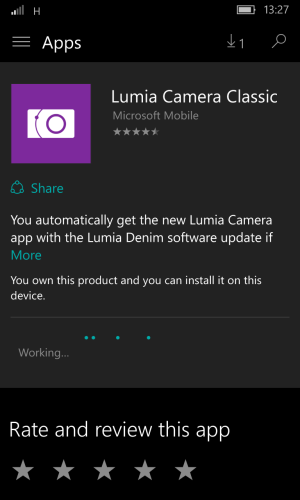
just went to library and tried clicking on the not available apps and got this! it lets me install but hangs saying "working" im not on a great connection so maybe it will work now using this method? do others want to give it a try?

wp_ss_20150717_0001.png
 

Members online

No members online now.

Forum statistics

Threads
341,230
Messages
2,264,297
Members
428,831
Latest member
Wiseguy