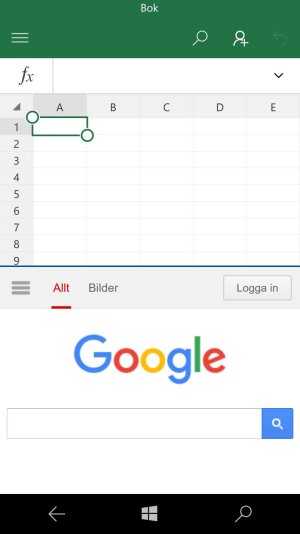
My concept of how split screen should look and function on Windows 10 Mobile

user4545

New member
Jun 27, 2012
48
0
0
When pressing the Windows button to enable one handed mode, the option of choosing an app that is open comes up in the current black unused space. If not picking an app, the view just stays as in the first picture and the user can continue using one handed mode. However, if choosing an app, that app is put above the app that was in use for split screen functionality.

What do you think?
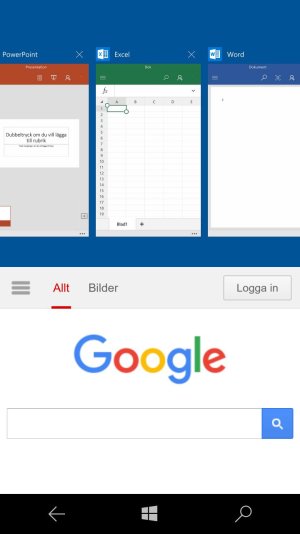
wp_ss_20160413_0008 124.jpg . . wp_ss_20160413_0008 123.jpg
 
It's a great idea, after all this is "WINDOWS" so they should put this in their plans in the future
 
Looks great! I'd go one step further and make the Start Screen the leftmost in that "list of running apps" which would then open the Start Screen in the top half and let you launch anything.
 
Nice. It would need some cue to indicate which 'window' is active. Also curious how the back button etc would/should work.
 
Nice.. looks cool. But probably won't happen. Or if it will, it won't be anytime soon.
Part of the problem is the smaller screens. I'm not sure if it would even work well for my 6'' 1520, and who knows how it would look like on 4.5''.
All in all, I like it. I hope it happens one day.
 
Nice.. looks cool. But probably won't happen. Or if it will, it won't be anytime soon.
Part of the problem is the smaller screens. I'm not sure if it would even work well for my 6'' 1520, and who knows how it would look like on 4.5''.
All in all, I like it. I hope it happens one day.
Download the pictures on your phone and look at them in full screen, looks good on my 950!
 
Last edited:
What I like most about it is that it takes an existing feature and adds to it without breaking the original intended function. Long pressing start still gives brings the running app closer to the bottom of the screen, but you get an extra way to fill the empty space. Brilliant!

Wait.. the bottom app would be running at half screen mode, which currently it doesn't I think. So apps would have to be adapted to be able to handle half-screen mode. Makes sense, just like it is in Win10.
 
What I like most about it is that it takes an existing feature and adds to it without breaking the original intended function. Long pressing start still gives brings the running app closer to the bottom of the screen, but you get an extra way to fill the empty space. Brilliant!

Wait.. the bottom app would be running at half screen mode, which currently it doesn't I think. So apps would have to be adapted to be able to handle half-screen mode. Makes sense, just like it is in Win10.
They currently run in half screen mode, the pictures are modified screenshots so the Google page in Edge is currently just as big/small as in the picture above.
 
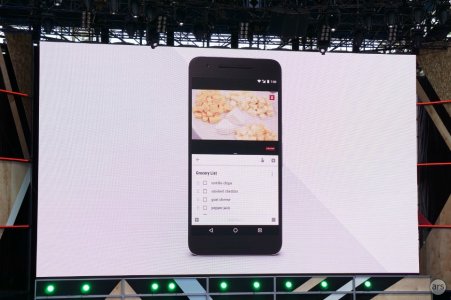
In related news: Google just introduced split screen multitasking for phones in Android N: (From the Ars Technica liveblog)

dsc07058.jpg
 
i think multitask is far away from windows phone cuz microsoft cant put a hight-end processors on their phone u know windows phone is behind in mobile market race.
 

Trending Posts

Forum statistics

Threads
342,368
Messages
2,265,447
Members
428,866
Latest member
Android_Creator