No Wifi calling option?

anon(5518418)

New member
Jan 19, 2013
117
0
0
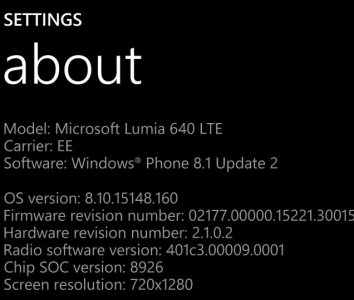
My L640 is the unlocked variety, I flashed EE firmware for wifi calling, I am now on TMO-GB. I have used wifi calling before on EE using an iPhone so I am registered but on the L640 there is no option for wifi calling.

Any ideas?
 
I'm on TMOB-US with out of the box firmware, but try going into settings - then cellular + SIM - then click on SIM settings. There is an option for wi-fi calling there.
 
Flash it to TMO-GB rom
If you want TMO wifi, you have to use TMO rom. wont work on Lumia otherwise.
 
Last edited:
Honestly I don't think so. I'm not an expert so I can't be sure, but in my experience the product code isn't a factor in anything other when using WPRT; you can change your product code at will, like flashing new rom for instance. The US TMO rom definitely has wifi calling as this is what I'm currently using. Product code is 059XOP7.
 
Honestly I don't think so. I'm not an expert so I can't be sure, but in my experience the product code isn't a factor in anything other when using WPRT; you can change your product code at will, like flashing new rom for instance. The US TMO rom definitely has wifi calling as this is what I'm currently using. Product code is 059XOP7.

And can you confirm that you did not buy this phone on TMO, you flashed the appropriate firmware and wifi calling now works? When I flashed the EE UK Rom firmware software etc all changed over but there was simply no option for wifi calling under sim settings.
 
No, this is a TMO US phone. Have you tried the TMO US rom (Product code: 059XOP7)? It could also just possibly be an APN setting. All I know is that I could never get wifi calling on any other rom because I am using TMO sim/service carrier.
 
But wifi calling is only available on TMO US and GB so you wouldn't get wifi calling on another ROM anyway. My phone was an unlocked CV phone. When I put the UK TMO rom on wifi calling would not appear.
 
You used to be able to download the T-Mobile Wi-Fi calling app, but it has since been removed from the Windows store. Not like it ever worked or anything (probably why its not available any more). I don't have a need or use for wifi calling so I never tried to nail down a solution. But now I'm curious. How about manually entering APN settngs while on TMO rom.
 
Last edited:
You used to be able to download the T-Mobile Wi-Fi calling app, but it has since been removed from the Windows store. Not like it ever worked or anything (probably why its not available any more). I don't have a need or use for wifi calling so I never tried to nail down a solution. But now I'm curious. How about manually entering APN settngs while on TMO rom.
I think that would probably work. Wi-Fi calling is built into the 640.
 
EE UK is TMO GB, For some reason the EE UK ROM comes up as TMO GB, EE own T-Mobile here in the UK

Yes I looked it up and TMO merged with EE. Is your 640 dual sim or single? If you have a single sim version you should be flashed to: RM-1072 - 059X1Q3 - EURO GB EE SL. I viewed the EE Wikipedia page, here's what it says about wifi calling:[WiFi Calling[edit]

EE were the first UK network to implement WiFi calling. Originally first available on the iPhone 5S and iPhone 6, they then included compatibility for their own Harrier handsets. However, this caused a major issue when the software update to enable WiFi calling caused devices to malfunction.[44]

It doesnt say if it was fixed, but im assuming it was. Also we know the 640 has native wifi calling enabled for TMO US and EE UK, so as long as your on the rom I mentioned you should be good to go... at least on paper. If it still doesnt work, i'd try and look in EE support forums to get to the bottom of it. Most likely would be some sort of APN parameter.
 
Yes going to give this another whirl and see what happens, in theory it should work so why it isn't baffled me. I remember on an Galaxy S5 I had to dissect firmware to get it going.
 
Right ok flashed EE Rom again. Still no option
 

Attachments

  • wp_ss_20150901_0002.jpg
    wp_ss_20150901_0002.jpg
    55.9 KB · Views: 27
  • wp_ss_20150901_0001.jpg
    wp_ss_20150901_0001.jpg
    74.6 KB · Views: 0
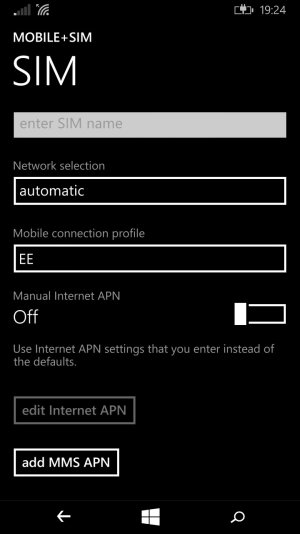
Ok, now I would look up the APN settings on EE website or support forum and manually enter the APN settings. It looks like the edit option is greyed out but you can still add.... no that is for MMS APN....hmmmm.
 
Im thinking you can download a custom mobile connection profile maybe? Looks like the sim you have wont allow you to edit the APN settings. Maybe a trip to EE store will get you a sim that would allow that if all else fails. I'm thinking this all has to do with APN. Maybe even a call to support and its a few keystrokes on their end.

edit: I missed it the first time looking at it but then noticed in the picture that the "Manual internet APN" is turned off, so you can edit the APN.

Did you get it working?
 
Last edited:

Forum statistics

Threads
342,571
Messages
2,265,653
Members
428,872
Latest member
grimmmmm