
OneNote Mobile Annoyance

CamiKitti

New member
Aug 25, 2011
311
1
0
Whenever I to apply the check boxes to a certain section of text, it shifts all of it to the check boxes. They need to fix this because it's really annoying to have all of the text to shift whenever check boxes are clicked on for ONE section. -.- It was better the way before when it didn't do that.
 
Whenever I to apply the check boxes to a certain section of text, it shifts all of it to the check boxes. They need to fix this because it's really annoying to have all of the text to shift whenever check boxes are clicked on for ONE section. -.- It was better the way before when it didn't do that.

I'm also having trouble understanding the issue you're having. Are you saying that if you put one of those little check boxes in the left margin for one chunk of text in a note, that additional check boxes are created for all the other other sections in that note? I'm not seeing that, and I'm very happy with how well OneNote works on my phone and with the background sync between phone and PC.
 
I see this too. It's easy to reproduce.

Open a new notebook.
Type something and note where the text starts.
Hit the check box button and it will add a check box in front of what you typed.
Hit enter to move to the next line and the next check box will be created.
Hit delete to get rid of the new check box.
Hit enter. The text will stay indented as if there were a check box in front of it. All text will be indented this way in any notepad with a list of checkboxes.

Ridiculous miss by MS.
 
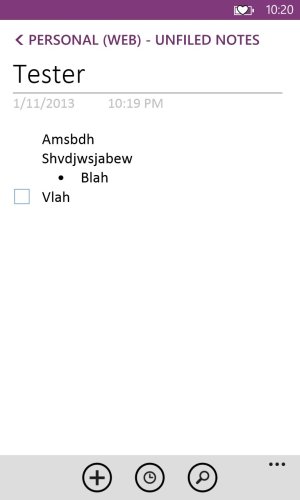
Here's an image. See how the bullets also indent when the boxes are put? Seriously?
If you try decrease the indent, it moves the check boxes past the title.
 

Attachments

  • wp_ss_20130111_0001.jpg
    wp_ss_20130111_0001.jpg
    57.1 KB · Views: 2
Ah now I understand. I just noticed the same issue. For me its not a big deal at all, but it is correct what you're saying.
 

Trending Posts

Forum statistics

Threads
344,164
Messages
2,267,269
Members
428,939
Latest member
BJB