
Organising partitions driving me nuts!
I've researched this so freaking heavily, but am still none-the-wiser on how to get everything exactly the way I want.
Had some lengthy chats with Surface Pro 3 support on the phone & via other mediums, they were absolutely useless.
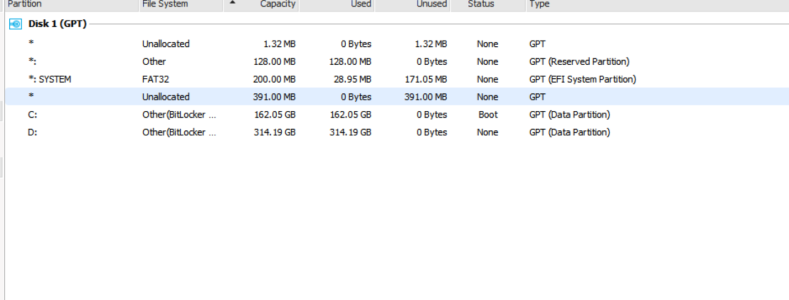
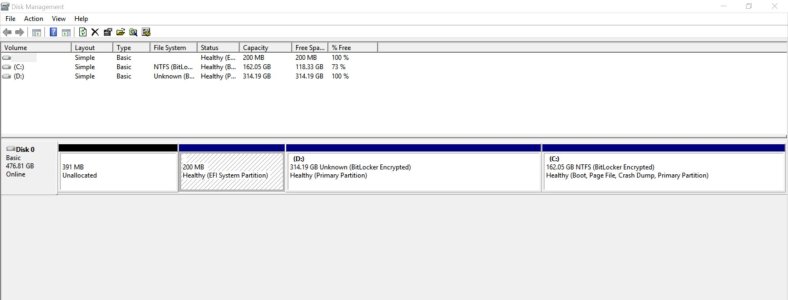
I've attatched 2 screenshots to illustrate where I'm at ATM. W.o. going into detail about everyting I've done thus far;
I've managed to get rid of some extraneous partitions, but I still want to merge that one final unallocted space into "c", the partion that's ~156GB.
Also want to know what the other 1-3 partions (not the 2 system ones) are about, & if they're crtical or not...
If you look at the 2 screenshots, DiskManager only shows 1 (200MB EFI System), but EaseUS Part. Manager Pro shows 2 more -odd- partitions.
Thank-you!
P.S.
What's with the damn spell-check here, for some reason it's not active when you're in-line & editing/posting?!?
I've researched this so freaking heavily, but am still none-the-wiser on how to get everything exactly the way I want.
Had some lengthy chats with Surface Pro 3 support on the phone & via other mediums, they were absolutely useless.
I've attatched 2 screenshots to illustrate where I'm at ATM. W.o. going into detail about everyting I've done thus far;
I've managed to get rid of some extraneous partitions, but I still want to merge that one final unallocted space into "c", the partion that's ~156GB.
Also want to know what the other 1-3 partions (not the 2 system ones) are about, & if they're crtical or not...
If you look at the 2 screenshots, DiskManager only shows 1 (200MB EFI System), but EaseUS Part. Manager Pro shows 2 more -odd- partitions.
Thank-you!
P.S.
What's with the damn spell-check here, for some reason it's not active when you're in-line & editing/posting?!?
Attachments
Last edited:




 Facebook
 Twitter
 Instagram