Organizing partitions is driving me nuts!

Rainy52

New member
Aug 10, 2015
1
0
0
Organising partitions driving me nuts!

I've researched this so freaking heavily, but am still none-the-wiser on how to get everything exactly the way I want.

Had some lengthy chats with Surface Pro 3 support on the phone & via other mediums, they were absolutely useless.
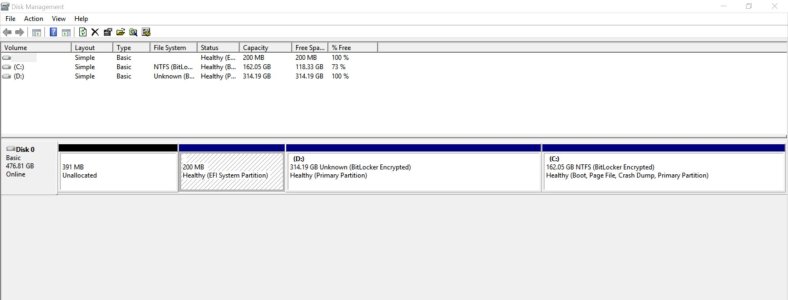
I've attatched 2 screenshots to illustrate where I'm at ATM. W.o. going into detail about everyting I've done thus far;

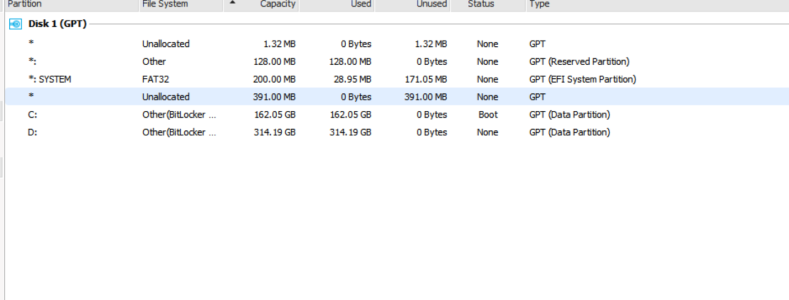
I've managed to get rid of some extraneous partitions, but I still want to merge that one final unallocted space into "c", the partion that's ~156GB.

Also want to know what the other 1-3 partions (not the 2 system ones) are about, & if they're crtical or not...
If you look at the 2 screenshots, DiskManager only shows 1 (200MB EFI System), but EaseUS Part. Manager Pro shows 2 more -odd- partitions.

Thank-you!
P.S.
What's with the damn spell-check here, for some reason it's not active when you're in-line & editing/posting?!?
 

Attachments
  • Capture.PNG
    Capture.PNG
    70.8 KB · Views: 9
  • Capture2.jpg
    Capture2.jpg
    90.7 KB · Views: 9
Last edited:
Re: Organising partitions driving me nuts!

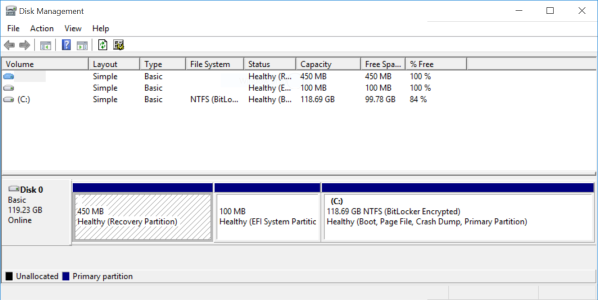
If it's a SP3 then you can just do a clean install after removing all of the partitions. You end up with 3, the two system ones and your C: drive.

Can't see any screenshot? Maybe as I'm using the WC app? EDIT: On the SP3 now so here is the partition arrangement after a clean install.

EDIT pt2:

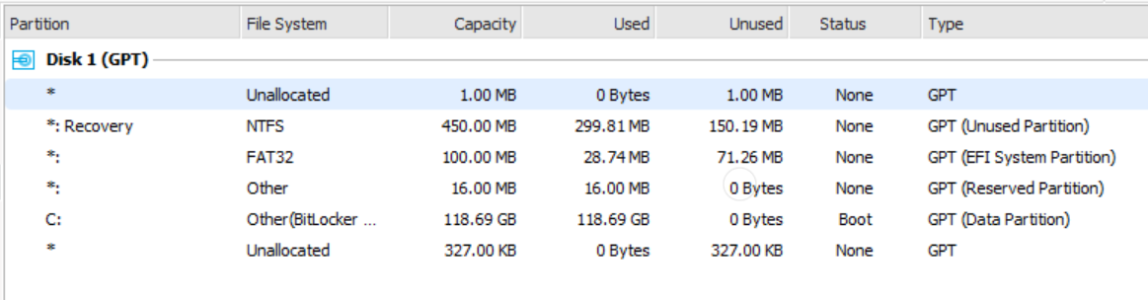
Attached a screenshot from EaseUS Partition Manager.....strange....but I'd leave your partitions alone as they are also on mine after a clean install!
 

Attachments

  • Capture.PNG
    Capture.PNG
    102.1 KB · Views: 5
  • Capture1.PNG
    Capture1.PNG
    66.5 KB · Views: 4
Last edited:
Re: Organising partitions driving me nuts!

Just delete all the partitions. That will leave you with one entry called unallocated space. Install Windows on that.


The Windows installer will automatically recreate those partitions that are critical and format as necessary. You'll end up with exactly the number of partitions W10 wants, sized to exactly what W10 deems most appropriate. That's how you get the cleanest W10 installation.


If you aren't setting up a multi-boot system, there simply is no reason to retain or manually allocate system partitions.
 
Re: Organising partitions driving me nuts!

Just delete all the partitions. That will leave you with one entry called unallocated space. Install Windows on that.

Which is what I did, but ended up with the extra partitions the same as the OP. Best leave them well alone!
 
Re: Organising partitions driving me nuts!

Which is what I did, but ended up with the extra partitions the same as the OP. Best leave them well alone!
Wrong. It's better to remove them and let W10 recreate them. That is far more likely to result in an optimal configuration than leaving remnants of what was an earlier Windows setup. Doing so also disposes of any partition misconfigurations which could be what is making the OP's life more difficult.


There is no risk involved in removing them.
 
Re: Organising partitions driving me nuts!


Not wrong...misunderstood (or miscommunicated!)

1. I removed all partitions
2. Installed W10 from USB

Although W10 Disk Management showed 3 partitions, when using EaseUS Partition Manager I had the extra partitions as did the OP. So I was saying to just leave them alone!
 
Re: Organising partitions driving me nuts!

No I want to keep the dual-boot setup I currently have, one with 8.1 & one with 10x, so I can't delete.
N.B. I'm also Rainy52 (well I'm not, but I'm dealing with this on their behalf).
 
Re: Organising partitions driving me nuts!

Well, somehow my freaking dual-boot's fckd now anyway. All I did was turn on auto-unlock or something like that for BitLocker on the Win10 volume whilst in 8, then I restarted in order to go back to Win10. Then I started to have a world of hurt (too much to explain it all), it appears I don't have any freaking option to boot into Win10 at all now, yet when I look in MSConfig it says it's all setup there still.

Okaaaay, that's freaking weird, now it's all okay... >.>
 
Re: Organising partitions driving me nuts!

Although W10 Disk Management showed 3 partitions, when using EaseUS Partition Manager I had the extra partitions as did the OP. So I was saying to just leave them alone!

I understood. At least in a single boot environment there is no reason to leave them alone. We can't be sure they are configured correctly just by looking at the limited info in that screenshot. Since there is no risk, we might as well delete them and be sure everything is as it should be.

Now that the OP has clarified that they are in fact working on a dual boot setup, things are of course entirely different. :straight: Then I wouldn't recommend deleting anything either, or at least not without a lot more info than we currently have.

If the little partitions are the only issue, then "all you have to do" is ensure every partition starts at a position on disk [kB] that is a multiple of 1024.
 
Re: Organising partitions driving me nuts!

Sorry, very time limited, will go into more detail tomorrow, I doubt anyone can help with this though, pretty sure I've covered all bases :(
 
Re: Organising partitions driving me nuts!

Sorry, very time limited, will go into more detail tomorrow, I doubt anyone can help with this though, pretty sure I've covered all bases :(

Without being more accurate, no. For example, there is no partition with a size of 159GB, which is the only partition you mentioned in the initial post. Maybe post what you expect your partitioning to look like when you're done, and mention why exactly you can't get it to look that way.
 
Last edited:
Re: Organising partitions driving me nuts!

For example, there is no partition with a size of 159GB, which is the only partition you mentioned in the initial post.

Sorry, meant to say: "but I still want to merge that one final unallocated space into "C", the partition that's ~162GB."
Can't edit OP as it was done with a diff. account...
Please confirm at least, that you can now see the 2 screenshots in the OP, I'll elaborate further later.
 

Forum statistics

Threads
342,589
Messages
2,265,671
Members
428,872
Latest member
grimmmmm