Remove Call Blocking numbers?

Luaper

New member
Dec 29, 2012
2
0
0
How do I remove numbers under Call Blocking?

I was testing it out. I added my home # to the list. But now, how can I remove that #? I don't see any options.
 
There could be an option under long pressing the number. Try that and let us know if that works. Think of the long press (pressing and holding the screen for about 3-4 seconds) as the right click on Windows, it brings up options you weren't sure existed.
 
There could be an option under long pressing the number. Try that and let us know if that works. Think of the long press (pressing and holding the screen for about 3-4 seconds) as the right click on Windows, it brings up options you weren't sure existed.

Unfortunately, that doesn't work. All I can do is edit the blocked numbers, but I cannot delete them.Oh well, thanks anyways!
 
All I can do is edit the blocked numbers, but I cannot delete them.

Don't be so sure on that. If you go into the edit screen, there may be an option there to delete. And if not, try blanking out the fields then confirming the edit. Two possible ways to delete it. I've seen a first party app hide the delete option within the edit screen.
 
I have a Nokia 920. To remove call+SMS blocker:

1. from the home page, click the phone icon
2. touch the elipses at the bottom right (...)
3. touch blocked calls
4. touch the blocked numbers box
To unblock one contact...
5. long-touch the number you want to remove from the blocked list
6. touch unblock
(verify a confirmation in the header that the number is now unblocked)

To unblock more than one,
5. touch the selection list icon (bottom middle of screen)
6. select the numbers to unblock
7. touch unblock
(verify confirmation in the header that the numbers are now unblocked)

 
I have a Nokia 920. To remove call+SMS blocker:

1. from the home page, click the phone icon
2. touch the elipses at the bottom right (...)
3. touch blocked calls
4. touch the blocked numbers box
...

I don't have this option!
 
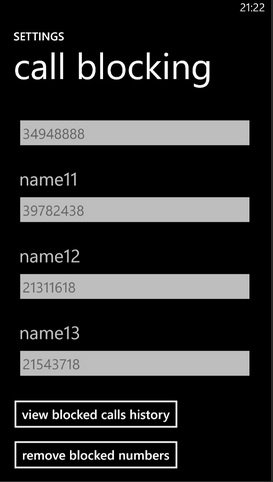
"remove blocked numbers", last button on the screen. Scroll down if you don't see it

Sent from my GT-I8750 using Tapatalk
 
I have a Nokia 920. To remove call+SMS blocker:

1. from the home page, click the phone icon
2. touch the elipses at the bottom right (...)
3. touch blocked calls
4. touch the blocked numbers box
To unblock one contact...
5. long-touch the number you want to remove from the blocked list
6. touch unblock
(verify a confirmation in the header that the number is now unblocked)

To unblock more than one,
5. touch the selection list icon (bottom middle of screen)
6. select the numbers to unblock
7. touch unblock
(verify confirmation in the header that the numbers are now unblocked)

How does this help someone with an ATIV S?
 
"remove blocked numbers", last button on the screen. Scroll down if you don't see it

Sent from my GT-I8750 using Tapatalk
That's weird. I try scrolling down, but it always snaps back to the top of the list. At the end, I don't see an option to remove any numbers.

EDIT: Oh geez. This is weird. If you try scrolling down from the bottom half of the screen (where your blocked numbers are), it doesn't go far. You have to swipe from the top half of the screen.
 
Yes, it's a little bit tricky. If you scroll where the numbers are, it scrolls the numbers, not the entire screen.
 

Trending Posts

Forum statistics

Threads
343,241
Messages
2,266,322
Members
428,900
Latest member
YeOldRam