
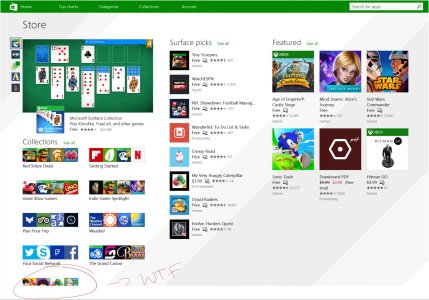
Seriously? Microsoft!
- Thread starter Omar9399
- Start date
You are using an out of date browser. It may not display this or other websites correctly.
You should upgrade or use an alternative browser.
You should upgrade or use an alternative browser.


- Aug 21, 2014
- 106
- 0
- 0
What device are you using? It's not like that on my desktop. On my Surface it's even worse than your screenshot but positioning it to portrait mode takes care of it.
Surface pro 3
- Aug 21, 2014
- 106
- 0
- 0
Kevin Rush
New member
- Aug 11, 2010
- 1,039
- 0
- 0
I think my Surface scrolls to show more. I'll check tomorrow. Isn't that an indicator that there is more? I think you maybe click the Show All label.

noersetiawan
New member
- Jun 27, 2014
- 514
- 0
- 0
- Aug 21, 2014
- 106
- 0
- 0
I think my Surface scrolls to show more. I'll check tomorrow. Isn't that an indicator that there is more? I think you maybe click the Show All label.
I know there is a see all link but what's is the use of unusable cropped images.
- Aug 21, 2014
- 106
- 0
- 0
That's the most annoying thing in the store.Doing store search will frustrates you more..
- Aug 21, 2014
- 106
- 0
- 0
Store has only vertical scroll.I think my Surface scrolls to show more.

hotphil
New member
- Nov 14, 2008
- 2,008
- 0
- 0
Only landscape on mine. There is a vertical "elevator" box, but it's non-functional. And cursor/Pg Dn etc don't work.Store has only vertical scroll.
Kevin Rush
New member
- Aug 11, 2010
- 1,039
- 0
- 0
I'm looking at my SurfacePro2 and I can't replicate the problem in the image the Original Poster (OP) posted. Even the layout is different from what the OP is showing. I'm on Windows 8.1.
I have horizontal scroll and sometimes vertical scroll when needed for the description at the left side.
I have horizontal scroll and sometimes vertical scroll when needed for the description at the left side.
Last edited:

gpobernardo
Active member
- Jan 12, 2013
- 4,338
- 0
- 36
I was looking 4 new apps in store and found this.View attachment 104874
and there is not way to access them. who did this store alignment dose he not know?
This piece of information would be very useful to the developers in Microsoft... if it actually reaches them. You could try sending them this feedback directly.


ClixT
New member
- Oct 10, 2012
- 277
- 0
- 0
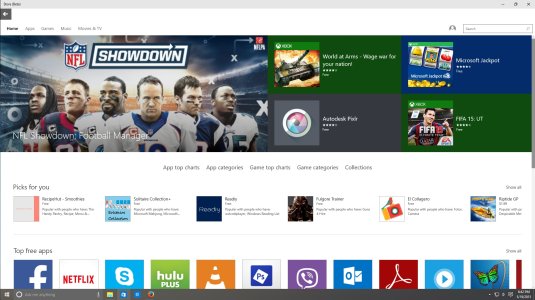
This piece of information would be very useful to the developers in Microsoft... if it actually reaches them. You could try sending them this feedback directly.
They pretty much fixed that with Windows 10..
EDIT: That problem is still present on my non beta store app... I'm using a desktop.
anon(8141431)
New member
- Oct 15, 2013
- 277
- 0
- 0
I was getting tired of saying "Windows 10 will fix everything"
But guess what? Windows 10 did fix it.
so..... yay?!
But guess what? Windows 10 did fix it.
so..... yay?!


- Aug 21, 2014
- 106
- 0
- 0
Ya I noticed that tooOn Windows 10 build 10080 (phone) the same thing is happening for the far right (the last) app.
http://i60.tinypic.com/352pt74.jpg
- - - - - - - -
But this is just a technical preview!
- Aug 21, 2014
- 106
- 0
- 0
Have you tried rebooting? Do that.
Have you tried fiddling with the resolution? Do that.
Weird stuff happens from time to time. I've never had that on my SP3.
Good luck.
I end up refreshing my surface but doesn't help.
Similar threads
- Question
- Replies
- 0
- Views
- 7K
- Question
- Replies
- 1
- Views
- 7K

- Replies
- 3
- Views
- 5K
- Replies
- 0
- Views
- 5K
- Replies
- 0
- Views
- 3K
Forum statistics

Space.com is part of Future plc, an international media group and leading digital publisher. Visit our corporate site.
© Future Publishing Limited Quay House, The Ambury, Bath BA1 1UA. All rights reserved. England and Wales company registration number 2008885.
 Facebook
 Twitter
 Instagram