
I've installed the Skydrive app on my Lumia 920, but whenever I try and view photo's on Skydrive that have been backed up by the phone it doesn't work.
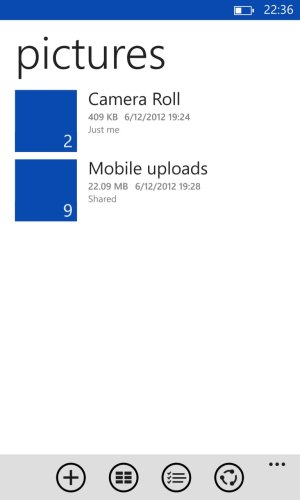
When browsing through folders it has big blue boxes next to the names of folders, that I would assume possibly should be showing preview pics of the files inside the folders?
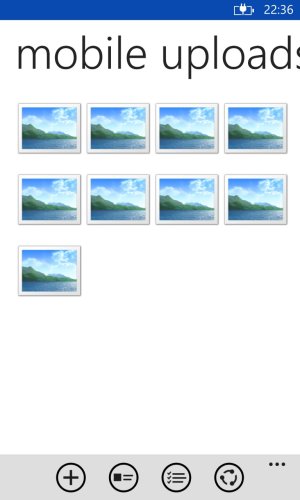
And when I go into a folder the view the picture files they are represented by placeholder icon images, instead of previews of the pics themselves which I assume should be there.
When I select one to open I get the error message "The file can't be displayed. Make sure you're connected to a Wifi or mobile network".
I'm definately was on Wifi when trying it, and I have also tried while connected to the mobile network, but get the same error.
I can view the pics fine if you log into Skydrive from a PC.
Is this a known bug with the Skydrive app? I saw a review for it from someone else who had the same issue so only rated it 1 star.
I've tried uninstalling and reinstalling the app but it still has the same issue.
(It can open up an Excel file I have saved on Skydrive with no problems. Just seems to be pics it has trouble with).
Thanks.
When browsing through folders it has big blue boxes next to the names of folders, that I would assume possibly should be showing preview pics of the files inside the folders?
And when I go into a folder the view the picture files they are represented by placeholder icon images, instead of previews of the pics themselves which I assume should be there.
When I select one to open I get the error message "The file can't be displayed. Make sure you're connected to a Wifi or mobile network".
I'm definately was on Wifi when trying it, and I have also tried while connected to the mobile network, but get the same error.
I can view the pics fine if you log into Skydrive from a PC.
Is this a known bug with the Skydrive app? I saw a review for it from someone else who had the same issue so only rated it 1 star.
I've tried uninstalling and reinstalling the app but it still has the same issue.
(It can open up an Excel file I have saved on Skydrive with no problems. Just seems to be pics it has trouble with).
Thanks.



 Facebook
 Twitter
 Instagram