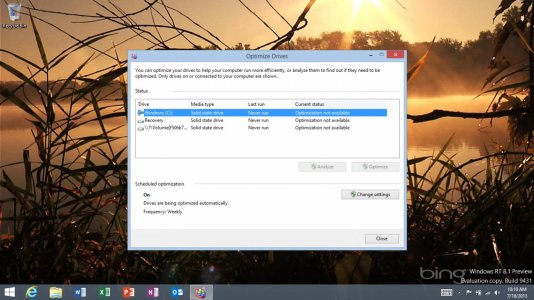
Surface RT optimization needed?

Michael Alan Goff

New member
Jan 15, 2012
1,073
0
0
This is something that might seem weird.

I was looking up something, forget what, and the optimize disk option comes up. Then t sys it needs optimization. But isn't that the defragment thing and isn't it terribly bad to defragment SSD? Or did they add something special to Windows RT for that sort of thing?

I'd rather not mess up My new computer if I can get away with it.
 
If computers running on Windows and use a SSD i thought windows didn't show that option. I am also not sure if "disk optimization" is defragmenting. But I don't think it is defragmentation since it is indeed a Surface RT and also running windows RT (zo mot made for HDD) so maybe it only a sort of indexing. I think it is safe to click on :P
 
Not 100% sure to be honest. Think it does the same sort of job though.

You get a small memory increase due it removing temporary files and such. Cant say I ever noticed an increase in speed, but I did get a lot less hangs on apps loading after it was done.
 
Not 100% sure to be honest. Think it does the same sort of job though.

You get a small memory increase due it removing temporary files and such. Cant say I ever noticed an increase in speed, but I did get a lot less hangs on apps loading after it was done.

That is enough reason for me.
 
It shouldn't, I'm running 8.1 on my Surface RT and my laptop (which also has an SSD) and have no issues optimizing drives. Just out of curiosity are you able to run Disk Cleanup? I wonder if running it then trying to optimize the drive would fix the issue (a longshot but worth a try).
 
It shouldn't, I'm running 8.1 on my Surface RT and my laptop (which also has an SSD) and have no issues optimizing drives. Just out of curiosity are you able to run Disk Cleanup? I wonder if running it then trying to optimize the drive would fix the issue (a longshot but worth a try).

Just ran it, optimization still not available. Still never run.
 
Have you potentially disabled any system services in the past, namely the "Optimize drives" one?
 
Nope. And when I go to the action center to start automatic maintenance... it then makes the status of the process say "running".

I don't get it.

How can it be running if it says it's not available?
 
I am having the same problem with an Asus Vivotab RT running the 8.1 upgrade. Optimization not available. Asus tech support told me they "could not duplicate" and told me to reset. I don't remember if this was available before I upgraded to 8.1. Sadly, under 8.0, I made a USB recovery key then deleted the recovery data. So my key is for original RT. Now it won't let me reset saying the media inserted is not valid.
 

Trending Posts

Forum statistics

Threads
343,573
Messages
2,266,661
Members
428,915
Latest member
josie_raye23