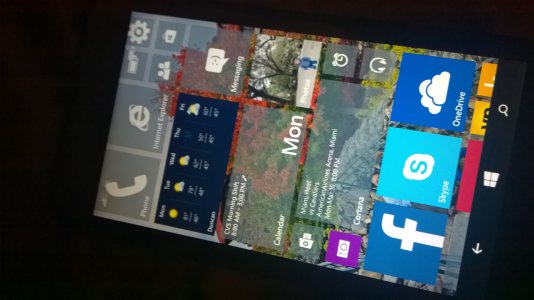
bulls96 Member Jun 25, 2007 723 0 16 Mar 16, 2015 #1 Got hold of the lightning deal on the 635 primarily to test out Windows 10. It took a while to install but now I got it. I wonder who else has it. How do I turn of transparent tiles on this thing? THanks.
Got hold of the lightning deal on the 635 primarily to test out Windows 10. It took a while to install but now I got it. I wonder who else has it. How do I turn of transparent tiles on this thing? THanks.
S ssapre New member Oct 30, 2012 767 0 0 Mar 16, 2015 #2 if you are talking about background wallpaper, you can set it up, works with 635 at least. Transparent tiles is not there yet with W10TP if you have read it already in forum.
if you are talking about background wallpaper, you can set it up, works with 635 at least. Transparent tiles is not there yet with W10TP if you have read it already in forum.
bulls96 Member Jun 25, 2007 723 0 16 Mar 16, 2015 #3 But my does have transparent tile Attachments WP_20150316_001.jpg 1.2 MB · Views: 20
xandros9 Active member Nov 12, 2012 16,110 2 38 Mar 17, 2015 #4 I think the start menu background options are semi-broken?
bulls96 Member Jun 25, 2007 723 0 16 Mar 17, 2015 #5 xandros9 said: I think the start menu background options are semi-broken? Click to expand... In what sense?
xandros9 said: I think the start menu background options are semi-broken? Click to expand... In what sense?
S solarscreen New member Mar 17, 2015 22 0 0 Mar 17, 2015 #7 I like the background better in Windows Phone 10. On 8.1 the background picture only shows behind the tiles, not the whole screen.
I like the background better in Windows Phone 10. On 8.1 the background picture only shows behind the tiles, not the whole screen.