Windows 8.1 Preview for RT

Took about two hours to officially download on my surface rt and now it is doing its restart and set up. Its at the getting devices stage now. 35%
 
Just a reminder, you have to be on your Surface RT to download the file. It will not work from another browser.
 
Anybody update their RT that had one of the indexing setups for their SDcard? As we all know by now, music/video files dont show up on the app as if they were in one of the music and video files in the windows explorer folder. So there were a number of work arounds whether it was junctioning, creating vhd and others. I did the vhd one so that my files in my sdcard recognizes through the music/video apps.

Did the preview update require to redo these steps?
After the upgrade, the SD card was unchanged, but the auto-mount script I added to mount it as a VHD and the Explorer registry change to 'hide' the actual SD card and display only the VHD was undone. But the subsequent poster had it right: Windows 8.1 fixes this in a way that makes the VHD method unnecessary and allows you to index content on an SD card without any hack.

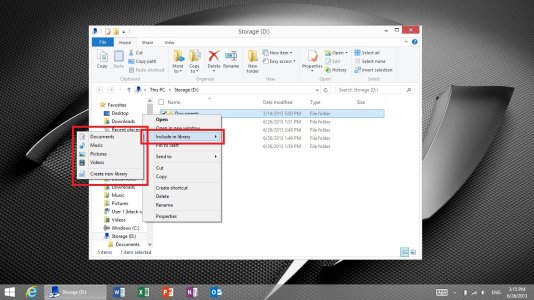
On SD cards, you can now right-click a directory on the card and choose to have it indexed as in the example below:
Screenshot (1).jpg

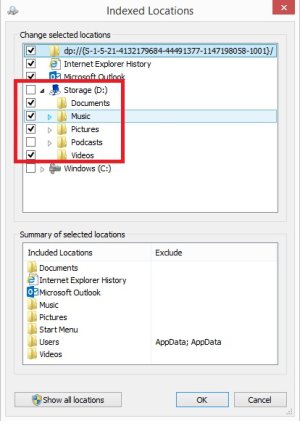
You can also add this setting another way or confirm the right-click index setting worked by opening 'Indexing Options' and choose Modify to see (or change) the current indexing settings:

Screenshot (2).jpg

I hope that helps...
 
After the upgrade, the SD card was unchanged, but the auto-mount script I added to mount it as a VHD and the Explorer registry change to 'hide' the actual SD card and display only the VHD was undone. But the subsequent poster had it right: Windows 8.1 fixes this in a way that makes the VHD method unnecessary and allows you to index content on an SD card without any hack.

On SD cards, you can now right-click a directory on the card and choose to have it indexed as in the example below:
View attachment 36487

You can also add this setting another way or confirm the right-click index setting worked by opening 'Indexing Options' and choose Modify to see (or change) the current indexing settings:

View attachment 36488

I hope that helps...

That is great, makes things easier. I dont have to keep rebuilding when adding new files.
 
I tried to update my Surface RT to 8.1, but just as it was finishing up the installation after reboot, the screen just went blank, and was staying that way for at least 10 minutes. I eventually did a hard reset and it restored my Surface to what I had before. Anyone else have this trouble?
 
I did a factory reset after installing (had some app issues) and had 20.2 GB free on my 32 GB version. Looks like they optimized space consumption :)
 
Also available is the ability to change the default save location or things like music, videos, and pictures. Go into PC settings --> PC & devices --> Devices and a the bottom you'll find the option to change it to the SD card.

I'd like to add that app loading is pretty much instantaneous compared to 8.0. I'm really looking forward to the final version of 8.1 as the preview can be a little laggy here or there (right now the keyboard is lagging a bit while I type this).
 
The messaging app is gone! Okay, cool I'll use their other 1st party app, Skype. The Facebook features aren't included in Skype for Windows 8! They really need to think this stuff through....
 
The messaging app is gone! Okay, cool I'll use their other 1st party app, Skype. The Facebook features aren't included in Skype for Windows 8! They really need to think this stuff through....
Hmmmm. Preview or not, there does seem to be a lot of issues with it. It won't install for me anyway, but I think I'll hold off for the proper version.
 
Great. I may be the first person that Windows 8.1 royally screwed. It was going through the install fine then it restarted and when it comes up now, it just has a blue screen and says, "Your PC needs to be repaired. The Boot Configuration Data file is missing some required information. File: \BCD Error code: 0xc000000d"
 
Great. I may be the first person that Windows 8.1 royally screwed. It was going through the install fine then it restarted and when it comes up now, it just has a blue screen and says, "Your PC needs to be repaired. The Boot Configuration Data file is missing some required information. File: \BCD Error code: 0xc000000d"

I think it's patently unwise to install these preview versions of OSes in anything but virtual machines. Unless you have spare PC lying around as a test rig.
 
Installed perfectly fine for me! Very nice update for Windows 8! Only thing, I cant wait till developers start supporting these new windows sizes! (*cough Netflix!)
 
Well, tech support was really nice and said they are probably going to exchange it. He couldn't tell me if it would be a new unit or a refurb. I'm really hoping new but probably not in the cards.
 
Well, it appears that my Surface is bricked...I was putting in my password after set up and it froze. I held down the power button to restart it, now it won't power up again. Sigh.
 
Worked on the Yoga 11. It took more than 2 hours, but it's alive!

One issue though: my Yoga 11 was originally in Chinese language and I had installed the English language pack. Now it refuses to do so..damn..

EDIT: no, it's downloading the language pack now, so no problem!
 
Last edited:
First impressions:
IE 11 is quick! Finally! I always had a terrible lag on some websites and it has disappeared now. I think this was my main reason of complaint about Windows RT (on my Yoga 11)
Swiping up to bring the apps list seems to make a lot of sense to me
Using the same background image for desktop and metro also gives a sense of "unity" to the OS. good.
 
Ah. It appears that no matter what I change, the default UI language will always report as EN-GB, hence I suspect no update for me until I find a charger and completely refresh as EN-US.
You can check your default UI language by running dism /online /get-intl at elevated command line
 
Glad MS finally put in the ability to index the sdcard to the library, no more VHD!!
Also, the RT is no more faster than it previosu was, still lags a bit.
 

Trending Posts

Forum statistics

Threads
341,937
Messages
2,265,015
Members
428,851
Latest member
emitbrown1977