Wrong info in SD card

ca_guri

New member
Dec 7, 2013
231
0
0
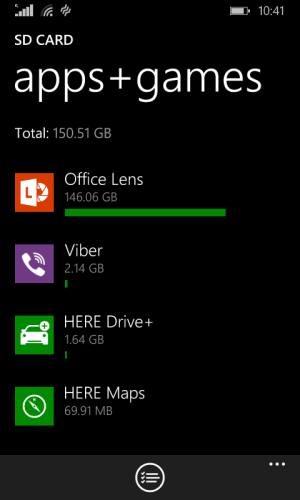
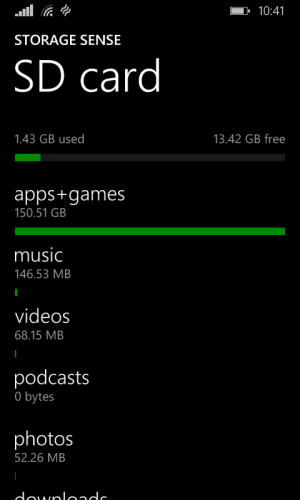
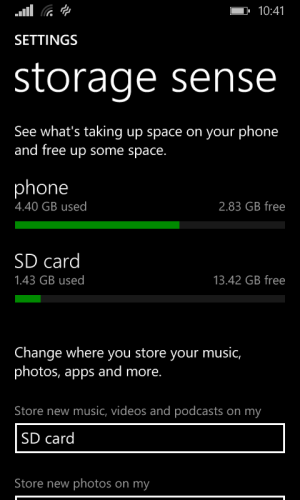
I don't know what's wrong with the sd card or app... Office lens shows 146GB...

Can somebody tell me what's wrong there and what is the solution for this...
 

Attachments

  • wp_ss_20150320_0001.png
    wp_ss_20150320_0001.png
    48.3 KB · Views: 3
  • wp_ss_20150320_0002.png
    wp_ss_20150320_0002.png
    50.7 KB · Views: 3
  • wp_ss_20150320_0003.png
    wp_ss_20150320_0003.png
    69.6 KB · Views: 3
I don't know what's wrong with the sd card or app... Office lens shows 146GB...

Can somebody tell me what's wrong there and what is the solution for this...

Its a bug,check whether it goes after restarting the phone
 
A hard reset is the last option.Go to settings-about-reset my phone and do it


I know it is the last option, but I don't want to do that and moreover it didn't bother me in any terms, & I have no problem with this yet.. I just put the query here to get the views why it is like so, but no one knows the answer so it seems like there is the problem with the sd card or the phone itself...

Anyway thanx... 😊
 
I know it is the last option, but I don't want to do that and moreover it didn't bother me in any terms, & I have no problem with this yet.. I just put the query here to get the views why it is like so, but no one knows the answer so it seems like there is the problem with the sd card or the phone itself...

Anyway thanx... 😊

Dont reset... Simply format the sd card... If still it shows then try to install that app on phone memory...
 
I know it is the last option, but I don't want to do that and moreover it didn't bother me in any terms, & I have no problem with this yet.. I just put the query here to get the views why it is like so, but no one knows the answer so it seems like there is the problem with the sd card or the phone itself...

Anyway thanx... ��

Unless it does not give any problems,there is nothing to worry about
 
Unless it does not give any problems,there is nothing to worry about

Then why did you suggest in a few posts earlier to do a hard reset?
Or in other words thanks that you want to help but do not give "hard reset" advice without a proper reason.
 
In my experience... Connecting via USB and opening Windows Phone for Desktop App on your PC scan the phone corrects a lot of indexing anomalies.

It's worth a try, it's free and it might just help.

On the other hand the App may be just reporting to Storage Sense the amount of material under its purview, no matter where that material is stored (phone, SD or cloud as a combined total).
 
@ca_guri I recently experienced this with my L535 SD card - the problem in my case was that the SD card was already failing. You may want to get a new SD Card while your card is still working.

Also, try connecting your SD Card to your PC and see if you will be prompted to "scan for errors". If you are prompted, you may proceed with the scan but it is unlikely that it will be fixed (since some SD Cards are automatically write-protected as soon as it starts to fail).
 

Forum statistics

Threads
342,445
Messages
2,265,527
Members
428,871
Latest member
venkatesh karunakaran