
Wtf is up with this browser??

Guitarpik

New member
Oct 6, 2012
273
0
0
Maybe I just haven't figured it out yet, but so far the browser on this phone is the worst I've ever used...

When I type wireless.att.com/order_status/order_status directly into the address bar I get this...

attsite.png


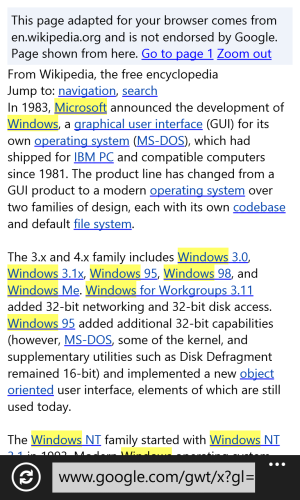
Any time I search for something through google, I get a really hideous looking page like these with pretty much no functionality...

gta5.jpg

wikipedia.png


Am I doing something wrong or is the browser really this worthless?
 
I don't know why you're getting that for the order page. Do you have your browser set to display pages as Mobile or Desktop view? I'd recommend using Desktop view.

As for the Google pages... yeah. It's how Google chooses to display pages when it detects IE for WP. Kinda jacked up. You end up having to click "View Page Directly" in order to see the page you want sometimes.
 
The AT&T thing looks like a server-side problem.

The Google thing is completely expected behavior for the Google spyware on non-Google platforms. It's best to use Bing, which renders pages properly on Windows Phone.
 
Maybe I just haven't figured it out yet, but so far the browser on this phone is the worst I've ever used...

When I type wireless.att.com/order_status/order_status directly into the address bar I get this...

View attachment 23079


Any time I search for something through google, I get a really hideous looking page like these with pretty much no functionality...

View attachment 23080

View attachment 23081


Am I doing something wrong or is the browser really this worthless?

it has something to do with the way google renders pages, so if your search using google via desktop mode your gonna have to click "view page directly". Once you click view page directly, everything loads just fine proving there's nothing wrong with your phone. If you don't mind viewing pages in mobile format, u can go to settings and change it to mobile mode... Or u can bypass everything and search with Bing instead of google.
 
I don't know why you're getting that for the order page. Do you have your browser set to display pages as Mobile or Desktop view? I'd recommend using Desktop view.

As for the Google pages... yeah. It's how Google chooses to display pages when it detects IE for WP. Kinda jacked up. You end up having to click "View Page Directly" in order to see the page you want sometimes.

I do have it set on desktop. The page just won't load for some reason :/
 
Thanks for the answers about the google issue. Kinda sucks cuz I find Google to give me much better results than Bing.
 
Google has taken active steps to ensure that content served to Windows Phones through Google services will always be garbage. They even blocked Microsoft's efforts to make YouTube function properly by closing the ports that MS was using for the app.
 

Members online

Forum statistics

Threads
341,347
Messages
2,264,415
Members
428,833
Latest member
siacuz
