10536 Outlook notification sound stopped

MetalHd

New member
Mar 24, 2009
56
0
0
After building a fresh 10536 phone with a new factory reset, my outlook alert sounds were fine.. a week a later, and email still flows, but no audible alert..

Anyone find a fix for this? Changing tones did not reset things either..

thanks
 
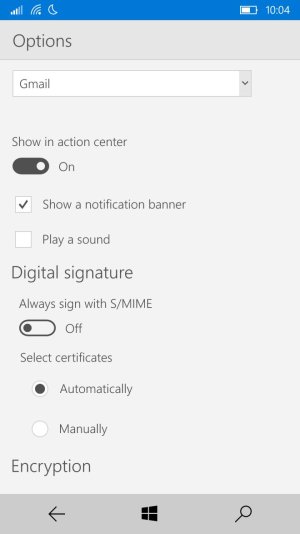
Make sure notification sound is actually enabled within the Outlook app, sometimes they get reset on an update. It's confusing, but Outlook allows notifications to be customized based on accounts. Any change you make to Outlook notifications from your phone settings won't make a difference if it's not checked within Outlook. Check out the screenshot below.

wp_ss_20150922_0001.jpg
 
I've found it ONLY works if "Show a notification banner" is checked on my 925. Haven't tried turning it off today after the latest Outlook update though.
 
That was it! Thanks.. they sure have put alot of settings in new places that don't follow previous logic on locations..
 
Yea, I agree, it's confusing. I think the reason they put it within the app is to allow different notifications types for different accounts.
 
That makes sense.. although I prefer the accounts separated.. the new toggle is cumbersome.
 

Forum statistics

Threads
342,656
Messages
2,265,733
Members
428,873
Latest member
greysonkorn