
2 mode for Navigation?

fob2000

New member
Oct 30, 2012
11
0
0
Does anyone know how to configure the Maps app to use 2D (overhead) view during navigation? I can use 2D mode just find when using the app; however, as soon as I enter into navigation mode it goes into 3D mode which is hard to use.

Also, is there a way to prioritize routs? I was going to another city an hour away but the map app estimated 3 hours. When I looked at the root it was ignoring the highways and only using inside roads.

I had to switch to Waze which hasn't been updated in years.

Help.
 
Press the North Up icon during navigation.

Hmm, it usually gives multiple routes options after tapping Directions. After tapping Directions, tap on My Location then press options. An Avoid box will appear. You can then confirm if avoid highways or other conditions are checked.

Hope this helps.
 
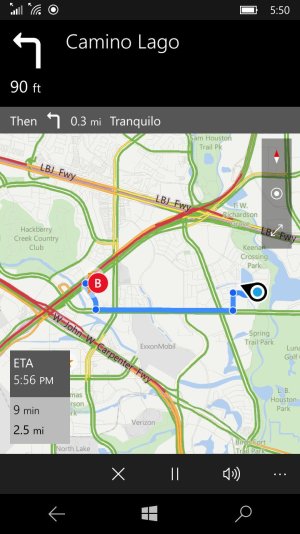
This is going to sound silly, but where is the North Up icon? I've tried tapping all settings but nothing seems to work. See screenshot. What do I tap??

wp_ss_20160509_0001.jpg
 
This is going to sound silly, but where is the North Up icon? I've tried tapping all settings but nothing seems to work. See screenshot. What do I tap??

The red and white diamond. It will cycle between 2d and 3d mode ONLY in navigation AND in 'screen follow mode'. According to your screenshot, it won't cycle between those modes because you're not in 'screen follow mode'. Hit the button below the diamond. The bottom two icons should disappear and only the North Up (diamond) icon will be available. This will enable you to cycle between the two modes.
 
I can't believe it is that simple. I promise I have hit every single icon trying to get it to work & this is the first time where I think it finally worked.

Thank you!
 

Forum statistics

Threads
342,593
Messages
2,265,675
Members
428,872
Latest member
grimmmmm
