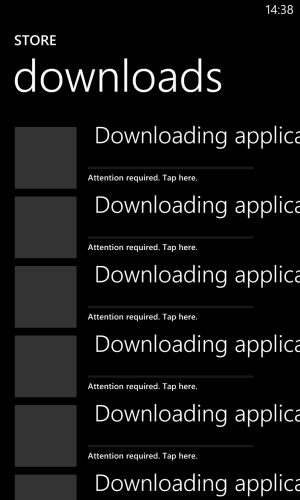
After Update: Downloading Applications issue

Talderon

New member
Nov 19, 2012
870
0
0
I have this list of apps that are in the downloads queue and in a state of *Action Required" however have no details in them. I can't seem to get rid of them. Any clues?

(Please see attached)

Thanks!
 

Attachments

  • wp_ss_20130331_0001.png
    wp_ss_20130331_0001.png
    125.6 KB · Views: 0
This is a by-product of the update process, caused by the restore process trying to download apps that are not available via the normal store (the Nokia apps).

Simply touch and hold each entry and select the delete option that pops up - things then sort themselves out within 24 hours, and you will get any applicable updates for those apps.
 
This is a by-product of the update process, caused by the restore process trying to download apps that are not available via the normal store (the Nokia apps).

Simply touch and hold each entry and select the delete option that pops up - things then sort themselves out within 24 hours, and you will get any applicable updates for those apps.

Duh, should have tried that. Thanks! :D
 
No probs. It's an annoying quirk that I hope they tidy up at some point, it makes the update process look messy.
 

Forum statistics

Threads
342,989
Messages
2,266,068
Members
428,892
Latest member
warmhomesgrant