app location in phone

vanhaute paul

New member
Feb 26, 2015
11
0
0
When I install an app from the store onto my phone, where is this placed ?
I suposse on the internal memory of the phone.
Is there a possibility to move the apps on the sd-card.
On my android phone, there it's possible.
What about the windows phone.
 
Yes there is.
Open the app Storage Sense.
There you can set the standard locations for apps (and other stuff)
But be aware that some apps by design can not be placed on a SD card.
Furthermore you can move apps from internal to sd card in the Storage Sense app
 
Apart from the MS apps that come as standard, the only app I've come across that could NOT be stored on the SD card is Telegram.

Being able to move apps and data to a card is one of the advantages of Windows Phone.
 
Apart from the MS apps that come as standard, the only app I've come across that could NOT be stored on the SD card is Telegram.

Being able to move apps and data to a card is one of the advantages of Windows Phone.

Next Gen News reader cannot go on SD card as well.
 
I don't find the app storage sense.
Is it possible that the app in only on the american store and not on the europe store ?
 
I don't find the app storage sense.
Is it possible that the app in only on the american store and not on the europe store ?

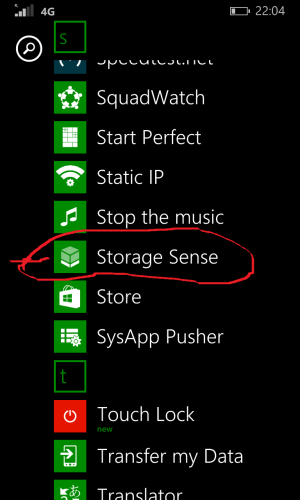
It's allready on your phone.
Your name sound Dutch and in Dutch it's called "opslag inzicht"
If you are not Dutch see below photo and look for the icon.
wp_ss_20150322_0001.png
 
Last edited:
Can I move apps already installed and set up on internal memory to the sd card? Without losing all the settings?


Sent from my iPad using Tapatalk
 
Can I move apps already installed and set up on internal memory to the sd card? Without losing all the settings?


Sent from my iPad using Tapatalk

Yes you can.
But as stated before not all can be moved. The ones which can not be moved will give a "message" that they can not be moved.
And in general a app on internal memory will not "lag" but on a SD card they may "lag" due to difference in read/write speed but with a class 10 card you will not notice it.
 
Yes you can.
But as stated before not all can be moved. The ones which can not be moved will give a "message" that they can not be moved.
And in general a app on internal memory will not "lag" but on a SD card they may "lag" due to difference in read/write speed but with a class 10 card you will not notice it.

In Storage Sense I can change the location where new apps are stored, but is there a way to move already installed apps from the phone to the SF card? I don't see how to do that.


Sent from my iPad using Tapatalk
 
Storage Sense >> Select Phone Memory >> Apps + Games >> Single/Multi Select Apps >> Move to SD Card from the 3 dots below
 

Trending Posts

Forum statistics

Threads
342,429
Messages
2,265,511
Members
428,868
Latest member
Charis Cheng