Build 11099.1000 in fast ring

Mark Kaplan

New member
Jan 31, 2013
1,099
0
0
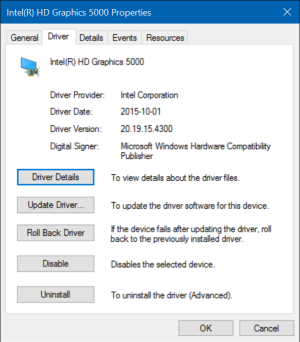
I've installed this build on my SP3. Update was flawless. I've only been using it a few hours but so far everything is working properly. I really dont see a huge difference yet. I was prompted to reinstall the 10/2015 hardware update which makes me wonder if it ever did really install previously.
 
I have installed it last night works great. Had no graphics errors until I reinstalled the 10/2015 hardware update. Then the problem returned. Back to reinstall Intels drivers then everything works again.
 
I have installed it last night works great. Had no graphics errors until I reinstalled the 10/2015 hardware update. Then the problem returned. Back to reinstall Intels drivers then everything works again.

What hardware?
 
It's really difference, on 11082 it's annoying that
you can't see the progress while moving so many large files which was known issues.
You can't tell when the file transfer going to finish.
Thanks to this 11099 release seems they've bugless known issues.
I'll get it into there soon hope that progress bar already fixed.
 
It's really difference, on 11082 it's annoying that
you can't see the progress while moving so many large files which was known issues.
You can't tell when the file transfer going to finish.
Thanks to this 11099 release seems they've bugless known issues.
I'll get it into there soon hope that progress bar already fixed.

"I do want to note something that we fixed in this build which was a known issue in the last build: the progress dialog when copying or deleting files via File Explorer now shows up as expected."

https://blogs.windows.com/windowsexperience/2016/01/13/announcing-windows-10-insider-preview-build-11099/
 
Don't worry I'll upgrade soon.

In fact, I've already full-awared that every new builds always fixed
the old known issues bugs & never happen again.
Only new bugs that never happen from the older bugs appear that all.
 
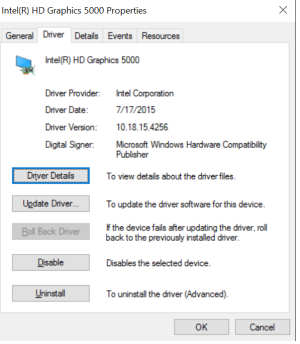
Did you reinstall the 10/2015 hardware update? It is after this update that my graphics driver keeps restarting sometimes. But updating to the Intel driver makes it work again. Strange.
 
Did you reinstall the 10/2015 hardware update? It is after this update that my graphics driver keeps restarting sometimes. But updating to the Intel driver makes it work again. Strange.

Yes, did it right after first bootup from the new build. No issues.
 
I did not get that version after the 10/2015 hardware update?
Now on Intel drivers i have:
2016-01-20.png
 
I will give it a try. I do notice some touchscreen disability at the edges of Chrome tabs. Could be this.
 
Got driver updates for graphic after the 11102 release. Now the updated ms drivers works. :-)
 

Forum statistics

Threads
342,696
Messages
2,265,774
Members
428,875
Latest member
Reneed