Camera and continuum

Chintan Gohel

Active member
May 23, 2014
10,784
1
36
I'm curious to know how or if the camera can work when a continuum enabled device like the 950 is in continuum mode

If the 950 is connected with the dock and a screen, what happens when launching camera app? Will it launch and show on the big screen or just show on the phone screen?

I don't have any continuum enabled phone so I can't test this on my own
 
Don't have a 950 but just tried it on my 950 XL, pressing the camera button just started the camera screen on the phone, pressing again took a picture, none of this showed up on my monitor.

It's just like you can have Continuum on and still make a call on the phone with no throughput to the monitor.
 
Don't have a 950 but just tried it on my 950 XL, pressing the camera button just started the camera screen on the phone, pressing again took a picture, none of this showed up on my monitor.

It's just like you can have Continuum on and still make a call on the phone with no throughput to the monitor.

it would have been interesting if you could also mirror the camera on the big screen so that you can use your phone to project a room or scene on a projector - I used to do this using project my screen app
 
it would have been interesting if you could also mirror the camera on the big screen
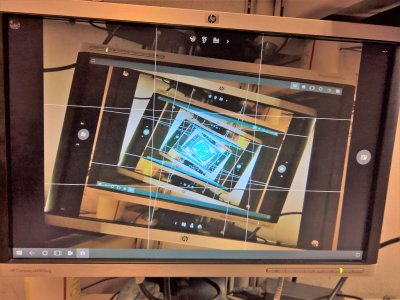
LIke this? my view of the camera came up on the continuum screen automatically. Allowed this funky shot. It was upside down for some reason, though.
 

Attachments

  • WP_20161028_10_01_27_Pro (2).jpg
    WP_20161028_10_01_27_Pro (2).jpg
    3.6 MB · Views: 1
I'll test this tomorrow. But I have previously used the camera while having something else in continuum. I guess if you open it from within continuum it will open there. Also you can always simply mirror the screen if that's what you want.
 
Already tested it. If you open the camera from the phone's screen, it opens in the phone's screen. If you open it from continuum screen, it opens in the continuum screen and works perfectly fine. If you want to mirror it just select mirror screens instead of continuum in the settings and that's it :)
 

Trending Posts

Forum statistics

Threads
342,484
Messages
2,265,566
Members
428,871
Latest member
breadcat