
Camera Clarity - Nokia LUMIA 920

Feb 28, 2014
24
0
0
Hi,
After taking the picture in Lumia 920, Suddenly images getting slightly soft !!!!!!!!! How to prevent this ???
Or any Updates need For This ????
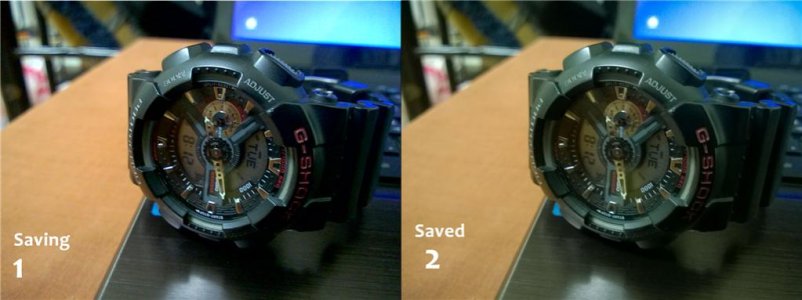
FileDownloadHandler.jpg

1. Picture Saving....
2. After Saved.
You can See the difference ...Check it plzzzzzzzz

Am Already .... had a soft reset. But again the same problem....

Check this link ...u can see the same problems with others also
http://discussions.nokia.com/t5/Nokia-Lumia/Lumia-920-images-are-not-sharp/td-p/1615792
 
Last edited:
Check out this thread: http://forums.windowscentral.com/gu...so-you-want-take-better-pictures-[guide].html

Specifically:

If you are seeing pictures that look perfectly sharp when you're focusing on a subject and after the picture is taken, everything seems to blur it's because Windows Phone saves a low-res preview of your image for you to zoom into and look around. It's low-res in order to keep the performance high, but unfortunately this means that you're seeing a lower quality, more blurred image than the picture you just took really is. If you want to view your photo in its true quality you can either view your pictures on a PC monitor or install the HD Photo Viewer app.
 
Sadly this can't be fixed. I've tried everything. You have to manually adjust it in creative studio until you think its better.
 
This is the 100000000000000th thread about this. I have something to say and will say it in the big thread.
 
Hi,
After taking the picture in Lumia 920, Suddenly images getting slightly soft !!!!!!!!! How to prevent this ???
Or any Updates need For This ????

View attachment 60496

1. Picture Saving....
2. After Saved.
You can See the difference ...Check it plzzzzzzzz

Am Already .... had a soft reset. But again the same problem....

Check this link ...u can see the same problems with others also
Lumia 920 images are not sharp - Nokia Support Discussions

Is a postprocessing software bug that was born from Amber fw (and remained with Black fw).
The only solution that we have is to downgrade to Portico (I also do this on my 920 ;-) )

PS: the other possible solution is hope in a fix in the next Nokia fw upgrade
 
Is a postprocessing software bug that was born from Amber fw (and remained with Black fw).
The only solution that we have is to downgrade to Portico (I also do this on my 920 ;-) )

PS: the other possible solution is hope in a fix in the next Nokia fw upgrade

There won't be a fix. The only thing we can hope for is RAW support. They did say right at the beginning that all Pure View devices will get it so we might get it in 8.1. Having said that, I have slightly changed my view about this and believe even digital cameras do similar processing and come out even worse. I tested my 920 against a Samsung ES74 camera and the 920 came out better and sharper.
 
There won't be a fix. The only thing we can hope for is RAW support. They did say right at the beginning that all Pure View devices will get it so we might get it in 8.1. Having said that, I have slightly changed my view about this and believe even digital cameras do similar processing and come out even worse. I tested my 920 against a Samsung ES74 camera and the 920 came out better and sharper.

I hope that is possible to install WP8.1 developer edition on Portico without before install Amber+Wp2GDR2 infact the problem is not the os WP but the firmware Amber/Black.
If is possible to make this then the issue will be fixed and the the procedure should be:
1)downgrade from fw Amber(with WP8GDR1)/Black(with WP8GDR2) to Portico(with WP8GDR1)
2)upgrade only the OS of Portico (WP8GRD1) to WP8.1 via the developer preview procedure

At the end the phone will use Portico fw and WP8.1 and the bug there will not be.
Perhaps I hope a lot.... :-|

(At the other side we hope that the new Nokia fw that should be release with WP8.1 can fix the issue)
 
Of course there's a fix, If the sensor got a perfect picture (saving) and after saved it's screwed, I'm sure there's a way to make that picture similar to the one saving..

It's ridicilous to have such a powerful camera and pictures like this, iphone5 or another device with a good camera beating 920 because it's crappy post algorithm..

The problem is that 920 has been discontinued, and lumia 930 is coming, So it's difficult to nokia to work harder on a device that has already been discontinued, but I do hope something changes on 8.1, because indoors pictures just sucks.
 
Of course there's a fix, If the sensor got a perfect picture (saving) and after saved it's screwed, I'm sure there's a way to make that picture similar to the one saving..

It's ridicilous to have such a powerful camera and pictures like this, iphone5 or another device with a good camera beating 920 because it's crappy post algorithm..

The problem is that 920 has been discontinued, and lumia 930 is coming, So it's difficult to nokia to work harder on a device that has already been discontinued, but I do hope something changes on 8.1, because indoors pictures just sucks.

u said it...
 
Of course there's a fix, If the sensor got a perfect picture (saving) and after saved it's screwed, I'm sure there's a way to make that picture similar to the one saving..
You don't see what the sensor has caught, don't even think about it when you are watching the live capture from the camera app
It's ridicilous to have such a powerful camera and pictures like this, iphone5 or another device with a good camera beating 920 because it's crappy post algorithm..
Please, you should get your eyesight checked
 
But wait if the photo is ok when viewed on a PC or with HD Photo Viewer app what is the problem?
 
Too much noise reduction?

one of many reason. Well yes :) Just try to shoot photos with ISO100 under decent light and that smudge'll eventually gone away.
I'd say it's over-denoising that leaded to smudged details and incorrect color cast
 
one of many reason. Well yes :) Just try to shoot photos with ISO100 under decent light and that smudge'll eventually gone away.
I'd say it's over-denoising that leaded to smudged details and incorrect color cast

And I guess Nokia will not be too bothered to improve this on the 920 as they want their newer phones to sell. It's disappointing when manufacturers behave like this.
 
We should hope in Nokia Cyan (the new nokia package that contains new nokia fw + wp8.1)

In my case if this package will not solve the issue I will remains with Portico (for me the quality of photos is more important that all new features introduced by the newer Nokia update)
 
There are so many thread about this. It started on Amber and remained in Black. The cause of this is the blurry algorithm applied by the current Nokia Camera Guy who are incompetent and blind. The temporary fix for this is by going back to Portico. The only thing I care about 8.1 update is the camera improvement. Camera is the reason I bought this phone.
 

Trending Posts

Forum statistics

Threads
343,367
Messages
2,266,450
Members
428,907
Latest member
longinotti101
