Can I store downloaded maps onto the Micro SD card?

Can I store downloaded maps onto my Micro SD Card as I don't want it to eat up the internal space?
yes, download lumia storage check
and go to maps , and choose store on sd card but it will store new maps on card, you have to delete your previous maps and download it again.
 
Won't d/l in the US (ATT). Anyone tried to install this by side-loading with Application Deployment?
 
yes, download lumia storage check
and go to maps , and choose store on sd card but it will store new maps on card, you have to delete your previous maps and download it again.

Is it safe if after downloading new apps I delete the Lumia Storage Check application?
 
Is it safe if after downloading new apps I delete the Lumia Storage Check application?

Only the BETA version supports changing map storage to SD. The normal version in settings doesn't have that option.


So you need to keep "Lumia Storage Check BETA" seperately in your app list. So no, you mustn't delete it.
 
Thanks for the confirmation. Will continue with it. :smile:

I use it aswel, and I suspect lots of other ppl too. :orly:

They really should include that option in the main setting. Lots of people like to keep their phone storage as clean as possible...
 
Only the BETA version supports changing map storage to SD. The normal version in settings doesn't have that option.


So you need to keep "Lumia Storage Check BETA" seperately in your app list. So no, you mustn't delete it.


What are you talking about? Of course it is possible to change maps location to SD card in normal version of Nokia Storage Check. I've never used or even tried BETA version.
 
What are you talking about? Of course it is possible to change maps location to SD card in normal version of Nokia Storage Check. I've never used or even tried BETA version.


Then "check" again cause that can't be so.


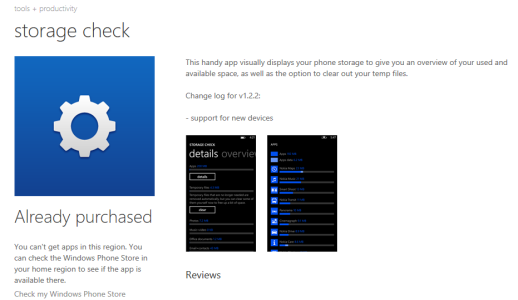
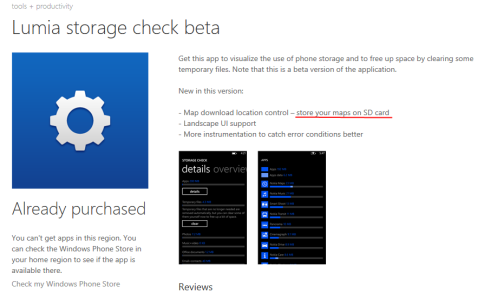
From the store descriptions :


Storage Check :

check2.PNG


Storage Check BETA :

check1.png


And officially from Nokia themselves :

https://betalabs.nokia.com/trials/Storage-Check
We have just released the official version as an update via the Store. It has all the beta 3 features, except the one to store Maps on SD card.


And also confirmed on several other sites :

8.0 apollo - How to save offline maps to SD card? - Windows Phone Stack Exchange

Store Offline Maps to SD Card in Windows Phone (this site is also talking about the "beta" version)


And then third, I have both versions on my phone :


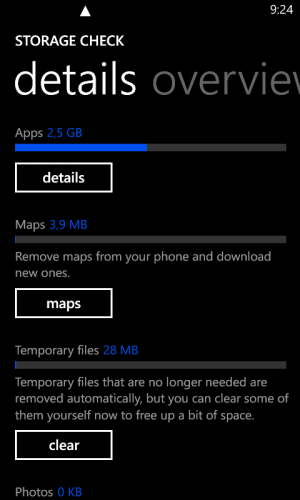
In settings, the normal version :


wp_ss_20140211_0001.png


-> Notice that from here you can only REMOVE and ADD maps in the same location. No option to change the storage location.


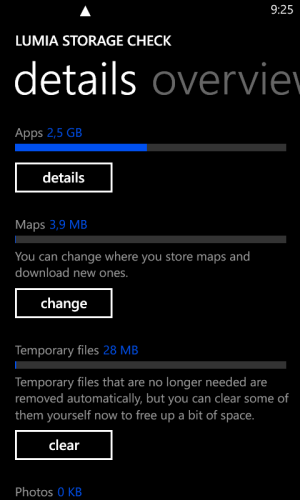
In app list, the BETA version :

wp_ss_20140211_0002.png


-> Notice, from here we do have the option to "CHANGE" where you store maps AND download new ones...
 

Forum statistics

Threads
343,457
Messages
2,266,545
Members
428,914
Latest member
zenadrone