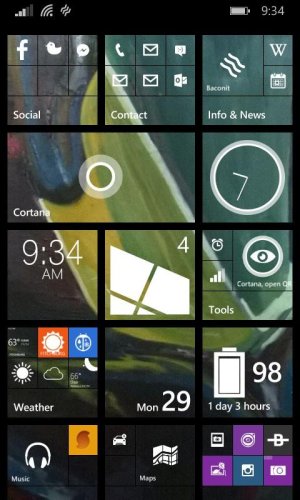
Can't find a decent home screen clock app

I did add it from the app itself. How else would you add it/

It's been working very well for me for the last 3 months (had it for 3 months in alpha release), but, I read the help section, hmmmmmmm, might work !
 
I finally got the app to display but I had to choose a different tile format. It will not support a wide tile only tiles the same size as on my screenshot. I wanted one twice as wide.

Thank you all for your help.
 
I did add it from the app itself. How else would you add it/


You can go to the app list press and hold, and a white box will pop up, pick pin tile this can be done with all apps but some may want you to pin from inside the app settings.
 
Oh, now I understand what you meant. I just didn't think of that. And yes I did pin the app from inside the opened app, but in my screenshot the reason there were two is one from in the app and one from the app list. Now the only one on my start screen is from inside the app and it works. It just wasn't the style and size I wanted but at least it works and updates the time minute by minute.
 
Analog Clock Tile is another very good one. I have that and TimeMe Tile on my screen.


BytFE7WIYAE0Ev5.jpg

Analog Clock Tile on the right column, 2nd tile down...TimeMe Tile left column, 3rd tile down.

Analog Clock Tile just updated recently with digital clocks, and wide tile support, if you're looking for that as well.
 
It's all down to personal choice. I use ClockHub on my L1520, even though it's just a basic digital clock that displays the time in 24hr or 12hr format. The display on the tile is a reasonable size, and it's not given me any issues, plus it's always displayed the correct time.
 

Forum statistics

Threads
342,212
Messages
2,265,290
Members
428,860
Latest member
billBuffer