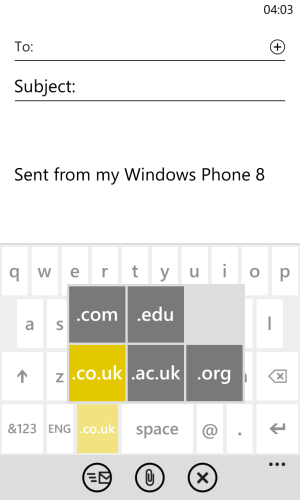
3ibs New member Dec 15, 2012 54 0 0 Jan 4, 2013 #1 I bought my phone in Ireland and when I first set it up it thought I was in the UK. I guess it was meant for the British market. How do I change the .co.uk on the keyboard whenever there's an email to a .com button?
I bought my phone in Ireland and when I first set it up it thought I was in the UK. I guess it was meant for the British market. How do I change the .co.uk on the keyboard whenever there's an email to a .com button?
Shodan_HR New member Nov 25, 2012 170 0 0 Jan 4, 2013 #2 yeah, i have a same problem... i `am from croatia but i have UK account
3ibs New member Dec 15, 2012 54 0 0 Jan 4, 2013 #3 ShodaNHR said: yeah, i have a same problem... i `am from croatia but i have UK account Click to expand... It's a small thing but it's annoying. I'd rather not have anything at all then have the .co.uk button!
ShodaNHR said: yeah, i have a same problem... i `am from croatia but i have UK account Click to expand... It's a small thing but it's annoying. I'd rather not have anything at all then have the .co.uk button!
clindhartsen New member Feb 28, 2011 80 0 0 Jan 4, 2013 #4 Settings > Language + Region (half way down) I don't have experience with this, but I imagine changing your region + phone language would likely change this. Also, check Settings > Keyboard and see what you can find there as well.
Settings > Language + Region (half way down) I don't have experience with this, but I imagine changing your region + phone language would likely change this. Also, check Settings > Keyboard and see what you can find there as well.
3ibs New member Dec 15, 2012 54 0 0 Jan 4, 2013 #5 clindhartsen said: Settings > Language + Region (half way down) I don't have experience with this, but I imagine changing your region + phone language would likely change this. Also, check Settings > Keyboard and see what you can find there as well. Click to expand... I had changed my language + region to US English earlier but nothing changed. I just changed the keyboard from English UK to English US and it did the trick. Thanks!
clindhartsen said: Settings > Language + Region (half way down) I don't have experience with this, but I imagine changing your region + phone language would likely change this. Also, check Settings > Keyboard and see what you can find there as well. Click to expand... I had changed my language + region to US English earlier but nothing changed. I just changed the keyboard from English UK to English US and it did the trick. Thanks!
Paarthh Gandhi New member Jun 11, 2013 1 0 0 Jun 11, 2013 #6 Hold press on co.uk or whatever domain name on windows phone KEYPAD. Other Domain names will pop up. select .com.
Hold press on co.uk or whatever domain name on windows phone KEYPAD. Other Domain names will pop up. select .com.
windev New member Jan 19, 2013 191 0 0 Jun 11, 2013 #7 Yep. Just press and hold the '.co.uk' key and a popup of other domain names should appear.





 Windows 10 Themes no longer working...
 Facebook
 Twitter
 Instagram