I'm not sure about this option, the stock camera has this option under video settings, while the Nokia camera doesn't, does it mean Nokia camera doesn't have it or that it simply can't be disabled?
The continuous focus option is only available in the stock camera app for all Windows Phones (including Samsung and HTC), not the Nokia Camera app for Lumias only.
To see the option, just open the stock Camera app, tap on "..." and choose Video Settings.
Huh, I just ran into this. I don't think I had this on my 1520 until recently when I reset my phone. So with this continuous focus tracking on, how do you focus on a subject that's not in the center?
Huh, I just ran into this. I don't think I had this on my 1520 until recently when I reset my phone. So with this continuous focus tracking on, how do you focus on a subject that's not in the center?
Not anymore, the built in camera app now continuously tracks the focus in the center of the screen, and tapping anywhere immediately takes the picture without refocusing. I'd like to turn this off.
Well it seems that you can't turn off continuous focus . The Nokia guys were very "smart" in not offering this option...as usual they deliver half baked cakes


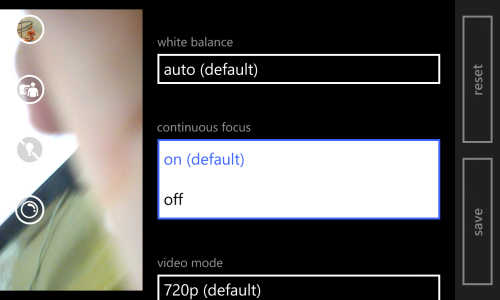


 . The Nokia guys were very "smart" in not offering this option...as usual they deliver half baked cakes

 Windows 10 Themes no longer working...
 Facebook
 Twitter
 Instagram