Cortana is not tracking my flights

dana_flood

New member
Oct 25, 2013
7
0
0
So, I've got a fair amount of business travel, and so far Cortana is not tracking my flights.

The emails aren't coming from a travel site nor an airline, and I wonder if this is the issue. I book using a proprietary travel program at work, and it emails the itinerary to my work account. From there, I forward it to my outlook.com address.

So far, I've had two flights, and Cortana hasn't detected either of them. Putting the flight info manually into a calendar event didn't do any good either. It popped up that I had an appointment, but didn't recognize that there was anything further to be done.

Any tips?

If I tell Bing Travel to track the flight, will Cortana grab onto that info?
 
I would try using bing travel in tandem, but I'd also remember that its a beta. Right now people are having all sorts of issues with location based stuff. Here's my question. Does she underline the flight numbers in your email? If so, you're going to have to click that because Cortana doesn't do much without you asking her, yet - or ever. It might be a privacy feature.
 
This was working for me in the initial release, but stopped in the latest update. Assume a bug was introduced.
 
Anyone got an update on this? i just got info from American Airlines and nothing special is happening in the email.
 
So, I've got a fair amount of business travel, and so far Cortana is not tracking my flights.

The emails aren't coming from a travel site nor an airline, and I wonder if this is the issue. I book using a proprietary travel program at work, and it emails the itinerary to my work account. From there, I forward it to my outlook.com address.

So far, I've had two flights, and Cortana hasn't detected either of them. Putting the flight info manually into a calendar event didn't do any good either. It popped up that I had an appointment, but didn't recognize that there was anything further to be done.

Any tips?

If I tell Bing Travel to track the flight, will Cortana grab onto that info?

PM Sent.

Thanks!
 
it does track it.
this is what I did. once I got the email from the confirmed reservation details. I opened the email, and click on "download pictures" so all the images and logos are download and exiting my mail.
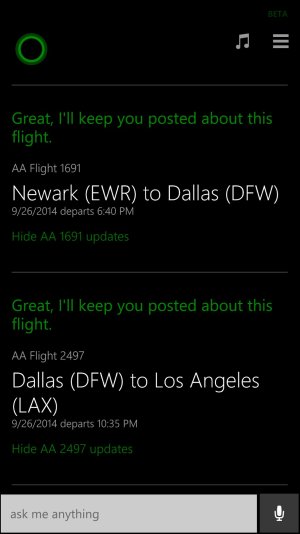
when I click on cortana, it had asked if i would like to track the flight (it would list all the flights, departure, 1st stop etc and return flight). I just clicked yes on all the flights and voila! that's it.
I have attached the screenshot
wp_ss_20140829_0001.jpg
 
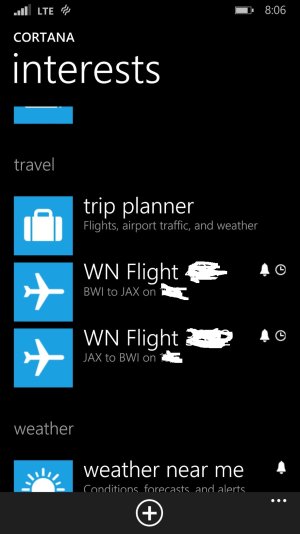
Took Cortana a day to find mine, but when she recognized it she asked me if I would like them to be tracked. I said yes, and now they appear in my interests.
wp_ss_20140902_0001.jpg
 
I had the same issue a few weeks ago. She was tracking my flight to Denver just fine, but my flight back to Minneapolis she couldn't find any info on. I was able to pull the data from the airline (Get an app Southwest!), but I was still a little disappointed.
 
I had the same issue a few weeks ago. She was tracking my flight to Denver just fine, but my flight back to Minneapolis she couldn't find any info on. I was able to pull the data from the airline (Get an app Southwest!), but I was still a little disappointed.

Aww you got me excited. I fly southwest exclusively, am a rapid rewards member and all. I read your post as you downloaded the Southwest app and was like "YESSSS IT EXISTS!!!!" only to search for it and become disappointed lol
 
It doesn't work for me either. I have even tried to ask cortana about the flight status manually and it didn't work. It showed me only web results. Argh!
 
There is a time sensitive window under which this operates.

Cortana read my flights off my Calendar, but only starting about two or three days ahead of the flight. It has to do with the sites she uses to track from. You won't see her tracking way before the flight is scheduled.
 
Why is this such a secret? Why don't they tell us how the "magic" works so we can just enter info correctly so Cortana picks it up.

If I enter the flight as a calendar event with Subject: SAN-JFK and Location: AA 123 she should figure out I want to track flight American 123 on a whatever the date the event is set for.

It's a great feature--but it's totally sporadic. I have no idea how to make her recognize or not recognize flights...and it doesn't seem that anyone else does either.
 
If you go to Cortana and interests and click on trip planner The language says "several hours before your trip find out when to leave for the airport what the weathers like where you are going and the status of your flight" Maybe there are some time restrictions in getting the information. I was just on a trip to Costa Rica and I was using my 920 instead of my daily driver 1520 and it didn't work for me either even though I had an email from AA on my flight and confirmations. Don't know if it would have worked on my 1520 or not. I don't fly very much two or three times a year round trip.
 
I came to the forums looking for an answer for this very issue. I have found that it has been very hit and miss. Out of three trips I recognized one. I book through work and the site adds the trip to Outlook once I press the appropriate button. I had a flight being tracked. I changed my flight to a week earlier. I look at the entry and it is in the system the exact same way. It has been a couple days and I still does not notice it. It was fantastic when a worked. However, it is useless if it wont work consistently.
 
Try this to manually kick start Cortuna to add the flight. (Works sometimes depending on the actual flight if it is a standard flight route).
?Open Cortana search, something like ?SWA 660? or "WN 1263"
?Cortana will respond by displaying the flight information. Included in that will be a colored link that says something like ?Show WN 661 updates?. Click on that colored link. (If the link/flight data is not found, then the flight might be a special added flight, not a regular flight for the route it will service on your day)
?Cortana will briefly respond with ?Hang on? for a few moments while she links up.
?Now click on the Cortana Notes menu in the upper right hand corner of the Main Cortana screen.
?Go to ?Interests?.
?Down in the ?Travel? section, you will see the entry for WN Flight 661. Tap on the entry, in this case ?WN Flight 661?.
?Select on the date down in the ?Flight date? field and select the correct date of the flight for your booking.
?Save the changes

This has worked for me a few times, but sometimes one leg of the flight isn't found. Each time the flight wasn't found, it was cause the flight was added on by the airline (I don't know, maybe to relieve volume).
 
Try this to manually kick start Cortuna to add the flight. (Works sometimes depending on the actual flight if it is a standard flight route).
•Open Cortana search, something like “SWA 660” or "WN 1263"
•Cortana will respond by displaying the flight information. Included in that will be a colored link that says something like “Show WN 661 updates”. Click on that colored link. (If the link/flight data is not found, then the flight might be a special added flight, not a regular flight for the route it will service on your day)
•Cortana will briefly respond with ‘Hang on’ for a few moments while she links up.
•Now click on the Cortana Notes menu in the upper right hand corner of the Main Cortana screen.
•Go to ‘Interests’.
•Down in the ‘Travel’ section, you will see the entry for WN Flight 661. Tap on the entry, in this case “WN Flight 661”.
•Select on the date down in the “Flight date” field and select the correct date of the flight for your booking.
•Save the changes

This has worked for me a few times, but sometimes one leg of the flight isn't found. Each time the flight wasn't found, it was cause the flight was added on by the airline (I don't know, maybe to relieve volume).

Perfect! this worked for me! Although it would be great if you could just say "Track Flight WN1263" or whatever your flight number was
 
Try this to manually kick start Cortuna to add the flight. (Works sometimes depending on the actual flight if it is a standard flight route).
?Open Cortana search, something like ?SWA 660? or "WN 1263"
?Cortana will respond by displaying the flight information. Included in that will be a colored link that says something like ?Show WN 661 updates?. Click on that colored link. (If the link/flight data is not found, then the flight might be a special added flight, not a regular flight for the route it will service on your day)
?Cortana will briefly respond with ?Hang on? for a few moments while she links up.
?Now click on the Cortana Notes menu in the upper right hand corner of the Main Cortana screen.
?Go to ?Interests?.
?Down in the ?Travel? section, you will see the entry for WN Flight 661. Tap on the entry, in this case ?WN Flight 661?.
?Select on the date down in the ?Flight date? field and select the correct date of the flight for your booking.
?Save the changes

This has worked for me a few times, but sometimes one leg of the flight isn't found. Each time the flight wasn't found, it was cause the flight was added on by the airline (I don't know, maybe to relieve volume).

Perfect! this worked for me! Although it would be great if you could just say "Track Flight WN1263" or whatever your flight number was
 

Trending Posts

Forum statistics

Threads
343,227
Messages
2,266,308
Members
428,900
Latest member
YeOldRam