
GDR3 and Nokia Black is now out on ATT! check your phones
- Thread starter Ultimateone
- Start date
You are using an out of date browser. It may not display this or other websites correctly.
You should upgrade or use an alternative browser.
You should upgrade or use an alternative browser.

jimmynexus
New member
- Sep 19, 2013
- 31
- 0
- 0
Great that its started to come out : )
Im on a sim free 1020 in the UK, no update here yet a though : ( Wonder when it will come out here.
Im on a sim free 1020 in the UK, no update here yet a though : ( Wonder when it will come out here.
maverick96
New member
- Nov 8, 2010
- 9
- 0
- 1
No I still have the terrible yellow tint even after doing this upgrade! So frustrating. Why couldn't they fix this issue????:unhappy:

niel27
New member
- Oct 25, 2013
- 44
- 0
- 0
No I still have the terrible yellow tint even after doing this upgrade! So frustrating. Why couldn't they fix this issue????:unhappy:
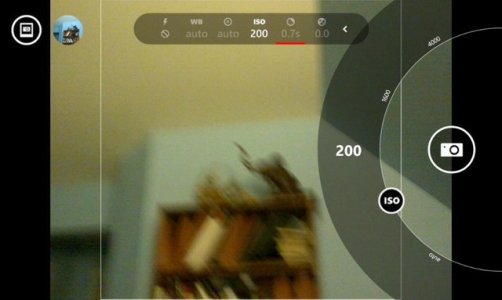
First: Original scene screenshot
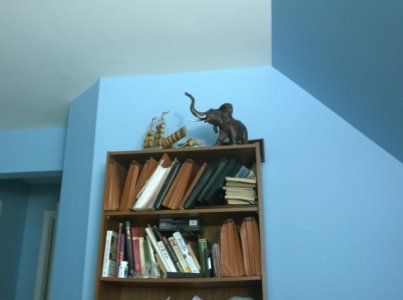
Second: without flash (no yellow tint)
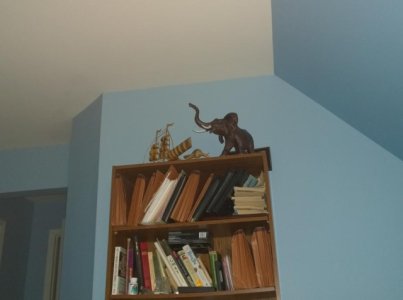
Third: with flash (no yellow tint again)
So happy with the camera performance now. Although right sided softness still exists. It's a lens hardware issue, though.

niel27
New member
- Oct 25, 2013
- 44
- 0
- 0
Guys any of u tried raw format and say how big is the file. thanx
I can let you know in few hours, charging my phone right now.
Guys any of u tried raw format and say how big is the file. thanx
I took a pic at work quick, after setting DNG. I went to info foe that photo and it only reported 1.3MB. I don't know if the phone will actually read the DNG size. Might have to plug into a PC for it.

hagjohn
New member
- Sep 15, 2013
- 209
- 0
- 0
Guys any of u tried raw format and say how big is the file. thanx
I took one picture. It was 41.6MB DNG file. Adobe Photoshop CS2 can't seem to open it (at least on my computer). "Couldn't not complete your request because it is not the right kind of document."
I took one picture. It was 41.6MB DNG file. Adobe Photoshop CS2 can't seem to open it (at least on my computer). "Couldn't not complete your request because it is not the right kind of document."
I used lightroom to work on the dng's from my 1520. I am pretty sure you need to convert them in lightroom or camera raw before you bring them into photoshop.

jojoe42
New member
- Sep 13, 2013
- 1,078
- 0
- 0
I used lightroom to work on the dng's from my 1520. I am pretty sure you need to convert them in lightroom or camera raw before you bring them into photoshop.
You can get a Camera RAW plugin for Photoshop for free on CS6 anyways (not the CC suite)


SlideWRX
New member
- Dec 7, 2013
- 116
- 0
- 0
Got the update. I was looking forward to shooting from a locked phone, but does not appear to work. Pressing the camera button while locked still brings up the keypad. Didn't find a setting for this; did I miss it?
edit: So this only works with the windows camera app? I switched to that and got it to work. Switching lenses to the Nokia pro app requires the security code.
edit2: Also, you *can* review pictures you have taken while locked. The lock changes to an arrow to go to the pic you just took. Hey wpcentral, fix your video explaining this function!
edit3: soo.... the Nokia pro cam app has to be updated to the new nokia camera app. Works as intended. :smile:
edit: So this only works with the windows camera app? I switched to that and got it to work. Switching lenses to the Nokia pro app requires the security code.
edit2: Also, you *can* review pictures you have taken while locked. The lock changes to an arrow to go to the pic you just took. Hey wpcentral, fix your video explaining this function!
edit3: soo.... the Nokia pro cam app has to be updated to the new nokia camera app. Works as intended. :smile:
Last edited:

montsa007
Ambassador
- Apr 10, 2013
- 3,036
- 0
- 0
niel27
New member
- Oct 25, 2013
- 44
- 0
- 0
Can somebody post a screenshot of their about page hiding the IMEI and other private things?
I have some issues that need to be sorted.
If it helps, I posted the screenshot yesterday in other forum "Lumia 1020 post black update"
Similar threads
- Replies
- 0
- Views
- 451
- Replies
- 3
- Views
- 16K

- Replies
- 4
- Views
- 20K
- Replies
- 0
- Views
- 18K
Trending Posts
-

-
Question Win-11 - Problem with moving files from C: to New Partition on E:
- Started by fasteddie01
- Replies: 0
-

-
 Windows 10 Themes no longer working...
- Started by DocCovington
- Replies: 6
-
 I'm looking for a CalDAV, CardDAV client for Windows
- Started by xandros9
- Replies: 1
Forum statistics

Space.com is part of Future plc, an international media group and leading digital publisher. Visit our corporate site.
© Future Publishing Limited Quay House, The Ambury, Bath BA1 1UA. All rights reserved. England and Wales company registration number 2008885.
 Facebook
 Twitter
 Instagram