Help: How do I download the Mobile app from the other websites?

Noman Shaam

New member
Apr 18, 2015
128
0
0
Greetings!


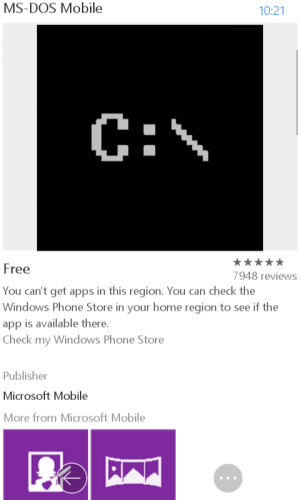
when i try to download apps from another site this message shows(See in picture). Why is this happening?


Any solution.
a78d814efae7ea405f8f6ba1f63bf98c.png
 

Attachments

  • wp_ss_20150504_0002.png
    wp_ss_20150504_0002.png
    52.3 KB · Views: 8
Last edited:
re: Help: How do I download the MS-DOS Mobile app from the Windows Phone Store?

Just click "Check my Windows Phone Store" and you should be able to download the app.

If you would notice in the address bar of your browser, there should be something that looks like "/en-us/". If your phone regional settings are not set to US, then this section should be changed to your appropriate region (which clicking on "Check my Windows Phone Store" will automatically do for you). For example, my phone regional settings is "United States". Hence, if I try to load a page that has "/en-ph/" (the string for the Philippines), I will receive the same message you received even if I'm actually in the Philippines. Clicking on "Check my...." will bring the "/en-us/" version of the page and I will be able to download the app afterwards.

 
Re: Help: How do I download the MS-DOS Mobile app from the Windows Phone Store?

Just click "Check my Windows Phone Store" and you should be able to download the app.


If you would notice in the address bar of your browser, there should be something that looks like "/en-us/". If your phone regional settings are not set to US, then this section should be changed to your appropriate region (which clicking on "Check my Windows Phone Store" will automatically do for you). For example, my phone regional settings is "United States". Hence, if I try to load a page that has "/en-ph/" (the string for the Philippines), I will receive the same message you received even if I'm actually in the Philippines. Clicking on "Check my...." will bring the "/en-us/" version of the page and I will be able to download the app afterwards.


Ok thanks i try
 
But when i changed my region USA. It opens windows phone play store. I want to download apps from another source. Another website.
 
But when i changed my region USA. It opens windows phone play store. I want to download apps from another source. Another website.


With Windows Phone, you can download only apps from the store (unless your phone is unlocked as a dev).
This is made to prevent the born and spread of malware and viruses.
Luckily, no such bad stuff exist yet for Windows Phone, so this Microsoft choice is working well.
 

Members online

No members online now.

Forum statistics

Threads
341,268
Messages
2,264,335
Members
428,833
Latest member
OrivelleFungusPen