
Keeping emails on mobile indefinitely

DallasXanadu

Member
Sep 28, 2013
193
0
16
I think Outlook in WM10 automatically deletes my emails after a couple of weeks, even if I leave them in my inbox/folders on my desktop. I can't find a way to change this setting. I would like to keep them on my phone until I delete them manually. Help?
 
I think Outlook in WM10 automatically deletes my emails after a couple of weeks, even if I leave them in my inbox/folders on my desktop. I can't find a way to change this setting. I would like to keep them on my phone until I delete them manually. Help?

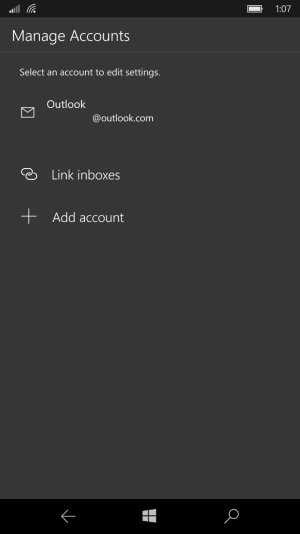
There is an option in the mail app for each account to keep the email on the phone under change mailbox sync settings and change the download email from to "anytime". This setting is accessed via manage accounts.
 
When I go to manage accounts, I see the account (I only have one). But I can't seem to edit anything. When I tap on it, nothing happens. I assume this is the screen you're talking about. Photo attached, if you're on the website, not the app.
replaced attachment.jpg
 
Last edited by a moderator:
When I go to manage accounts, I see the account (I only have one). But I can't seem to edit anything. When I tap on it, nothing happens. I assume this is the screen you're talking about. Photo attached, if you're on the website, not the app.
View attachment 138204

I have editted your screenshot, by copy and pasting in paint and removing the first portion of your email. In future, make sure you edit your screenshot so you don't leave your email out in the open to be spammed :grincry:.

Have you tried long pressing the email and see if you get a dialogue box?

Also please use the quote function so that way people get notified that you've responded. It makes it easier to track and reply :).
 
I have editted your screenshot, by copy and pasting in paint and removing the first portion of your email. In future, make sure you edit your screenshot so you don't leave your email out in the open to be spammed :grincry:.

Have you tried long pressing the email and see if you get a dialogue box?

Also please use the quote function so that way people get notified that you've responded. It makes it easier to track and reply :).

Ah man, I LOVE spam! Not really, thanks. Tap, long press, nothing happens either way. I think I'm going back to using the mobile outlook website. It's just easier overall. Ever since WM10, both the email app and the calendar have been wonky for me.
 
Ah man, I LOVE spam! Not really, thanks. Tap, long press, nothing happens either way. I think I'm going back to using the mobile outlook website. It's just easier overall. Ever since WM10, both the email app and the calendar have been wonky for me.

No problem.

Hmm, that sounds like a hard reset may be in order... I had issues with missing features until I did a hard reset but... there is no guarantee... so ymmv.

Also there was a oultook mail + calendar app update in the store recently, that may help resolve your issue.
 

Trending Posts

Forum statistics

Threads
342,333
Messages
2,265,411
Members
428,865
Latest member
gwb21471
