you know when the phone closes,the screen you have to slide up,thats the screen i wanted the photos to appear randomly,when i first got the phone and i linked facebook with it ,it gave me the option to have all my facebook albums randomly show on that screen,but i changed networks and had to open the phone,and it froze on me, so i had to reset to factory default,but i don't know how i did the photo thing now,also i had the photos as a large tile on start screen,but now it wont pin for me, thanks for replying to my post, any help gratefully appreciated:smile:





 Usually when you try and pin an app and you find that it's greyed out, it usually means it is already pinned to your start screen. Just double check on your start screen that the Photos tile is not already pinned. It may be that it's already pinned as a small tile and you haven't noticed it. If it is pinned as a small tile, it will look like the tile I have circled in the picture below. Note the tile itself is steel grey in colour, as that's my current theme colour, but yours would be whatever your theme colour is at the moment. If you find it, just make the tile bigger and it should scroll through your picture albums then.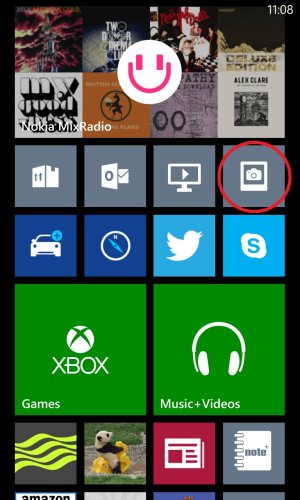



 Facebook
 Twitter
 Instagram