
Hello,
We're using several Lumia 640's at work. Recently i discovered an option "call transfer" which gives you the possibility to put a call in wait and transfer this call to a new call. The only thing is, this option is only available at one Lumia 640, even with other phones installed with windows 10 mobile, the option isn't available. (settings - telephone - advanced - advanced setting - Call Transfer on/off)
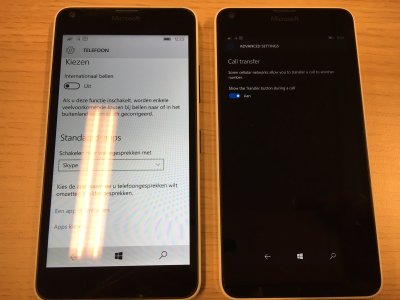
I contacted the operator also and they also have no clue how you can enable that advanced menu. Below you can see a screenshot of the two phones, installed with win 10, left no advanced menu available, right its available.
Anyone know this feature?
We're using several Lumia 640's at work. Recently i discovered an option "call transfer" which gives you the possibility to put a call in wait and transfer this call to a new call. The only thing is, this option is only available at one Lumia 640, even with other phones installed with windows 10 mobile, the option isn't available. (settings - telephone - advanced - advanced setting - Call Transfer on/off)
I contacted the operator also and they also have no clue how you can enable that advanced menu. Below you can see a screenshot of the two phones, installed with win 10, left no advanced menu available, right its available.
Anyone know this feature?



 Facebook
 Twitter
 Instagram