Music + Navigation on Windows Phone 8

profet

New member
Nov 27, 2012
21
0
0
I'm coming from Android where I routinely used Spotify + Google Maps together at the same time to provide navigation + music for my car rides.
Spotify would play until Maps had directions for me, the music would pause, google maps would read the direction, and then the music would continue playing.

So far while using Xbox Music + Verizon Navigator as soon as I go into the VZ Navigator application the music stops for good. If I try to switch back to the music then VZ Navigator closes and I can't get back to it without relaunching it (thus pausing the music).

Is this a limitation of the platform? Or is this exclusively a problem with the Verzion Navigator app?
 
I'm coming from Android where I routinely used Spotify + Google Maps together at the same time to provide navigation + music for my car rides.
Spotify would play until Maps had directions for me, the music would pause, google maps would read the direction, and then the music would continue playing.

So far while using Xbox Music + Verizon Navigator as soon as I go into the VZ Navigator application the music stops for good. If I try to switch back to the music then VZ Navigator closes and I can't get back to it without relaunching it (thus pausing the music).

Is this a limitation of the platform? Or is this exclusively a problem with the Verzion Navigator app?

First what kind of phone do you have?

Second, if you're in your on a drive and you want to do this, here's my advise:
Choose your playlist or selection of songs to play and press play (from the music + videos hub)

Open your navigation app and start your navigation.

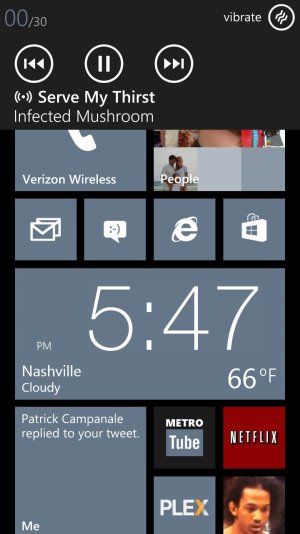
If the music stops, simply press a volume button and press play on the media drop down bar.

Those steps are only if VZW navi. pauses your music and doesn't stop it altogether. If it's the latter, then i'd recommend using a difference navigation app since it would seem that's a problem with that specific app.
 
If the music stops, simply press a volume button and press play on the media drop down bar.
isn't it dangerous to operate the phone while driving? Especially since the navigation system has just sent out some information, it might be in a situation in which driver needs to concentrate on driving
 
don't want to make a new thread for this, but is there a way to "next" and "previous" song on the device using the volume rocker? i used to be able to double click the volume on my wp7 device and it would change the song, but it doesn't working on my 8x
 
isn't it dangerous to operate the phone while driving? Especially since the navigation system has just sent out some information, it might be in a situation in which driver needs to concentrate on driving

Right... Because who doesn't use a phone while driving. /s
 
don't want to make a new thread for this, but is there a way to "next" and "previous" song on the device using the volume rocker? i used to be able to double click the volume on my wp7 device and it would change the song, but it doesn't working on my 8x

Erm... no?
What was your old device? I had a Focus. I could only do as such with the inline remote on my headphones and that was with the pause/play button, not the volume keys
 
Can anyone confirm a navigation app that DOES allow BG music?

And also... my Trophy AND 8x give me the ability to skip songs when hitting the volume rockers.. is this what you are referring to?


Edit: Sorry guys - misread. I have never had that functionality either. BoxShot_20121209054817.jpg
 
Erm... no?
What was your old device? I had a Focus. I could only do as such with the inline remote on my headphones and that was with the pause/play button, not the volume keys

dell venue pro


that's unfortunate. was a nice convenience feature.
 
Turn-By-Turn Navigation (doesn't lower or pause music, but will run while playing music).
 

Trending Posts

Forum statistics

Threads
343,246
Messages
2,266,327
Members
428,902
Latest member
yagoldt