Mute All Sounds?

steve peters

New member
Sep 4, 2013
10
0
0
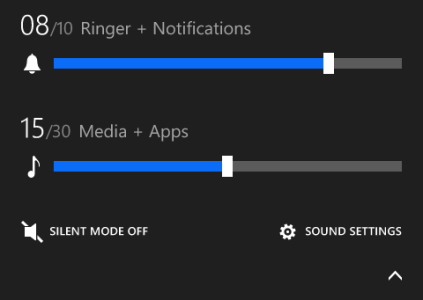
I've been having a hard time finding a mute all function in WP 8.1 preview. Has anyone else found it? I can mute both of the new sliders, but if I'm in a theater I just want to hit one button and have all sounds muted.

 
I've been having a hard time finding a mute all function in WP 8.1 preview. Has anyone else found it? I can mute both of the new sliders, but if I'm in a theater I just want to hit one button and have all sounds muted.

Maybe you can solve that with a sound/volume profile.. There was an app in the store, but i can't remember the name.. WPC also had an article about it.. Do a google search :)
 
I appreciate the feedback - but - a search (with many different key words and phrases) brings me to years old information, I'm looking for up to date 8.1 info. In WP 8, all you had to do was hit the volume up/down and click on one button to silence the phone. Today, you have to hit the up/down, then mute one and then the other control. I know it's no big deal, but it seems like we went backward. I also see no where in WP Central that speaks to a mute all sounds button.

Thanks for taking the time.
 
I appreciate the feedback - but - a search (with many different key words and phrases) brings me to years old information, I'm looking for up to date 8.1 info. In WP 8, all you had to do was hit the volume up/down and click on one button to silence the phone. Today, you have to hit the up/down, then mute one and then the other control. I know it's no big deal, but it seems like we went backward. I also see no where in WP Central that speaks to a mute all sounds button.

Thanks for taking the time.

If you are on 8.1 just go to notification settings, add quiet hours as a quick access button to the drop down list and whenever you need privacy just hit the quiet hours icon...
 
I appreciate the feedback - but - a search (with many different key words and phrases) brings me to years old information, I'm looking for up to date 8.1 info. In WP 8, all you had to do was hit the volume up/down and click on one button to silence the phone. Today, you have to hit the up/down, then mute one and then the other control. I know it's no big deal, but it seems like we went backward. I also see no where in WP Central that speaks to a mute all sounds button.

Thanks for taking the time.
Unfortunately that's the new way now. You have to silence both sliders now.
 
I also vote for a mute all button. I use a Bluetooth headset while driving. I used to click the volume control to mute before exiting the car to go into a meeting, restaurant, movie, etc. Now I can't easily do that. I have to unplug my audio cable and turn off my Bluetooth headset before I can get to the main phone ringer volume and mute it. I then have to remember to turn the ringer back on before I connect the Bluetooth headset or the audio cable to the car. Very clunky. My vote is for the volume control dropdown to include access to all possible peripherals AND the main phone volume whether they are connected or not so the volume can be set at any time. I also am still frustrated that the volume levels reset to initial settings after a reboot. With multiple volume controls, now I have change the Bluetooth, phone, and audio back each time. Ugh.
 
People complained and complained forever that WP lacked separate volume controls. Now there are separate volume controls and people complain about not having a single Mute All button. If they add a Mute All button people will complain that they just want to mute the device, not headphones- or device and headphones, but not Bluetooth. The iPhone has a simple physical mute button and people complain that it's not configurable. Android lets you configure everything and people complain it's over-complicated. I guess I'd just say "stop being so whiny".

It's an extra tap to mute calls and media; BFD. Or use Quiet Hours from an Action Center toggle.
 
They had a mute all button but they removed it from the Developer's Preview for some reason.

8.1 volume sdk.png
 
It took a bit but I finally get it. Quiet hours can be used manually without setting specific hours. This solves the problem for me. No messing around with individual volume controls for different peripherals. I followed the above advice and added it to quick settings. Still wish the volume settings would be maintained after a reboot.
 
Not so with the Quiet Hours app being recommended rather than the inbuilt Quiet Hours functionality. The QH mutes all (except alarms).
 
Not so with the Quiet Hours app being recommended rather than the inbuilt Quiet Hours functionality. The QH mutes all (except alarms).
Hmmm...
I just installed it and I can still hear music (yes I activated the setting before playing music).
 

Forum statistics

Threads
342,987
Messages
2,266,066
Members
428,891
Latest member
Usersite