no audible email notification.

jayblazer

New member
Feb 18, 2014
123
0
0
Alright guys when I get an email the surface makes no sound at all. I do get the pop up notification on the lock screen but nothing as far as a sound saying "hey you got an email". I have looked all over the web and this site but I can find nothing steering me the right way. I have my show notifications clicked but kind find anything about sound other them in the desktop.
 
I don't have an RT device, but I'm running Windows 8.1.

To get notification settings, you need to go to change PC settings>search and apps


Then go to notifications and make sure notification sounds are enabled


Then you'll need to select the Mail app to get notifications.


I have mine set to 'off', since I use Outlook, not Windows 8.1 Mail.

I'm running Windows 8.1 x64, but I don't think these settings should be different on RT, since the information about notifications is the same for desktop 8.1 and 8.1 RT on Microsoft's site. How to manage notifications for Mail, Calendar, and People - Microsoft Windows Help
 
Alright does anyone have a tip for turning off the lock? I hate having to enter my password over and over
 
Alright does anyone have a tip for turning off the lock? I hate having to enter my password over and over


If you want to remove passwords completely, go to charms bar, change pc settings, accounts, sign in options, password policy. Or you can set a picture password or 4 digit PIN.
 
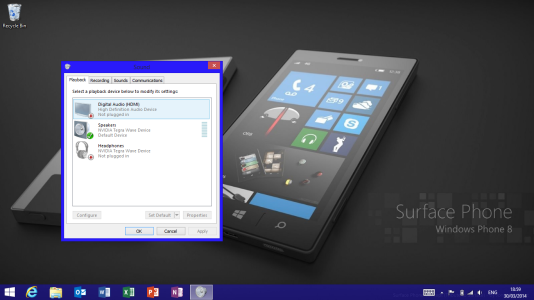
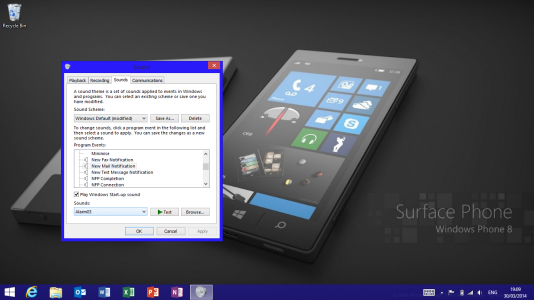
First you need to open your charm bar and type "Sound" in the search bar and that will bring up a list with a few options, you need to select the one that had just Sound and that will bring up a settings box that will look like the one below. Tap sound on the top bar and you will see that you can change the sound of everything you want. There are loads of different sound to pick from.

One other thing, I'm sure you know this but just in case, you need to have the volume (using the volume rocker on the side) up to a largish number to be able to hear the notifications.
 

Attachments

  • Screenshot (12).png
    Screenshot (12).png
    434.5 KB · Views: 3
  • Screenshot (13).png
    Screenshot (13).png
    432.6 KB · Views: 3
yup i have been through all that.. what about toast notifications?? honestly im not getting anything on screen telling me i have an email.. i still feel like its just something simple im missing..
 
Alright I have had a breakthrough. I got a notification to pop up. Last thing I did different was change the duration that the notification was visible to 5 minutes. But it did take a really long time to get the notification. I am using yahoo mail and I have it set to receive it as it comes but it took a good 15 minutes. Amy tips for getting it pushed faster?
 
Alright I have had a breakthrough. I got a notification to pop up. Last thing I did different was change the duration that the notification was visible to 5 minutes. But it did take a really long time to get the notification. I am using yahoo mail and I have it set to receive it as it comes but it took a good 15 minutes. Amy tips for getting it pushed faster?

There is a separate Yahoo Mail app. I have no idea how well it works, since I only use Yahoo as a semi-junk account for mailing list subscriptions, not anything important, and I don't use this app. Yahoo! Mail app for Windows in the Windows Store
 
I have the standard mail app and the yahoo mail app both linked to the same accounts. Should I delete one of them and just use the other? I sort of ended up with them both since I wasn't sure what I was doing at set up. I have two yahoo accounts. And originally had each linked to one of the apps. But in all this mess o ended up adding the other account to each app.
 

Forum statistics

Threads
343,024
Messages
2,266,105
Members
428,892
Latest member
MamasKoekeloere