Nokia Lumia 1520 suddenly showing "Not for Resale" during boot up

let's break it down:
- that OS version (8.10.14234.375) is much larger than mine (AT&T 1520 RM940 = OS: 8.10.14219.341) on Lumia Denim, WinPhone 8.1 Update
- that banner is for preview software, which appears to be on the device
- under SETTINGS >> Phone Update - you can set this to AUTO install updates (possibly GDR2, possibly set to ON) preliminary to Win 10 for phones
- check for Windows Insider installed under apps, or Preview for Developers
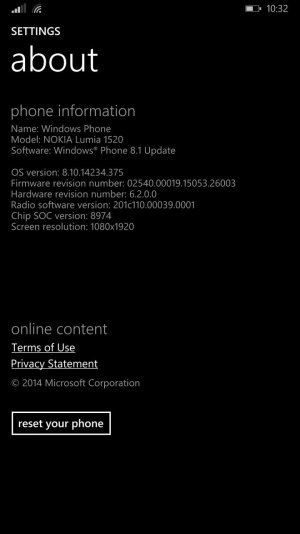
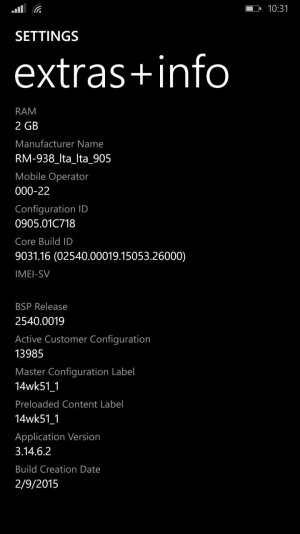
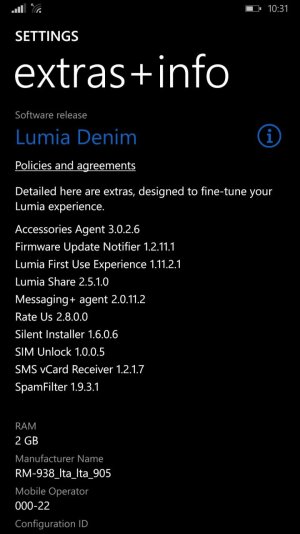
- screen shot your SETTINGS >> ABOUT screen (blurring out your IMEI), SETTINGS >> EXTRAS & INFO screen
- I do realize the RM938 the OP has (an assumption) could be different, but ...
 
I purchased my Nokia Lumia 1520 from B&H about a month ago, and everything is working well until today. My phone suddenly decided to reboot by itself, and screen with the Windows logo booted twice. The second time has the red "Not for Resale" in the left corner. I checked the IMEI, and it appears to be clean. Is there a bug on my device, or should I be really concerned about the ownership?

This would be indicative of an update, being (AUTO) installed. Sounds like you took GDR2 ...

Check your PHONE UPDATE settings!

BEFORE you Hard Reset, you gotta find out WHY! - you could wind up w Win 10 for Mobile (kinda meh right now for a daily use phone - I have it on my Lumia 635)
 
Last edited:
Your phone is a bit outdated then, MDK22, my Lumia 920 has his same version without having the "Not for Resale" banner. So the problem isn't there, wonder where though...
 
To OP,
1)Download the recovery tool and hook up your phone. The tool will tell you your version and offer the latest version your carrier offers or the latest public build for your phone.
2)Update/downgrade as necessary.
3)Problem solved
 
Your phone is a bit outdated then, MDK22, my Lumia 920 has his same version without having the "Not for Resale" banner. So the problem isn't there, wonder where though...

hmmm, interesting, what is your phone on - Preview for Developers, or ...
my Lumia 1520 RM-940 (on AT&T) shows NO UPDATES ...
 
hmmm, interesting, what is your phone on - Preview for Developers, or ...
my Lumia 1520 RM-940 (on AT&T) shows NO UPDATES ...

AT&T OS version bundled with Denim is slightly behind others (other variants and other models).
 
hmmm, interesting, what is your phone on - Preview for Developers, or ...
my Lumia 1520 RM-940 (on AT&T) shows NO UPDATES ...

Sorry for the late reply, but nope, it's purely from updates, did PFD after, but it didn't find anything. My phone is the RM-831_eu_euro2_530 (long manufacture name).
 
Thank you for all of the replies. I took a screenshot of the info, and I hope it's the right ones.
Other issues I'm noticing include certain apps being unable to download, unable to move apps to the SD card, some games resetting after rebooting the phone (after normal shut down), and the battery saver app not showing time since last charge. I updated my phone through "phone update" from settings.

wp_ss_20150425_0003.jpg wp_ss_20150425_0002.jpg wp_ss_20150425_0001.jpg
 
Your phone does look alright from the screen shots provided. I would advice restoring the firmware using Lumia/Windows Recovery Tool just to make sure all software glitches are ironed out. Make sure your microSD card is outside the phone during the restore.
 
Thank you for all of the replies. I took a screenshot of the info, and I hope it's the right ones.
Other issues I'm noticing include certain apps being unable to download, unable to move apps to the SD card, some games resetting after rebooting the phone (after normal shut down), and the battery saver app not showing time since last charge. I updated my phone through "phone update" from settings.

View attachment 103174 View attachment 103176 View attachment 103177

Can I also check with you, if you updated to Windows Phone 10 and reverted back to Windows Phone 8.1?
 
As far as I know "not for resale" mark isn't something unusual if you've got Windows 10 TP installed. If it really was meant not to be (re)sold, you wouldn't be able to update your phone via settings. ;)
 
Last edited:
I have never updated to Windows 10, so I will try to use the recovery tool as suggested. I will try to keep this forum updated after I find anything new in case someone else is having similar problems.
 
Hey, try to use Windows Phone recovery tool, it will install the latest version available (and right one for your phone) ^^
 
Tried the recovery tool and hard resetting the phone, and nothing has worked. My phone still thinks I have the demo version of the os. Doesn't affect the overall functionality of the phone, but I can't move apps to the SD card. Some games clear saved progress after reboot, and Netflix playback is permanently damaged.
 
I would actually use NCS and perform a dead flash, nothing would beat a clean dead flash
 
I would actually use NCS and perform a dead flash, nothing would beat a clean dead flash
That is kind of beyond my abilities, but I will keep the option in mind.

Not sure what happened, Netflix decided to work again after reinstalling the app. Another app also decided to cooperate again. I'm going to leave my phone alone for now before it becomes uncooperative.
 

Trending Posts

Forum statistics

Threads
342,480
Messages
2,265,562
Members
428,871
Latest member
breadcat