
Nokia Software Recovery tool doesn't see my phone

Status
Not open for further replies.

Siva vij

New member
May 9, 2013
11
0
0
Hi All,

I have installed the latest version of nokia software recovery tool 1.4.3. I want to downgrade my lumia 820 developer preview to win 8 to update lumia cyan. When i plugin to my lap, and started the nokia recovery tool it says couldn't read information from phone. FYI phone is working properly with laptop, i can copy files to the phone.
i am using windows 8.1 in my laptop.

Any help how to downgrade :unhappysweat:
 
Re-install the NSR. The NSR installation will install a special driver for phone USB connection. If it is somehow messed up (like you uninstalled another version of NSR) this driver, NSR won't be able to detect the phone although the phone will be fine communicating with Windows. You need install NSR while phone is not plugged in.
 
Re-install the NSR. The NSR installation will install a special driver for phone USB connection. If it is somehow messed up (like you uninstalled another version of NSR) this driver, NSR won't be able to detect the phone although the phone will be fine communicating with Windows. You need install NSR while phone is not plugged in.

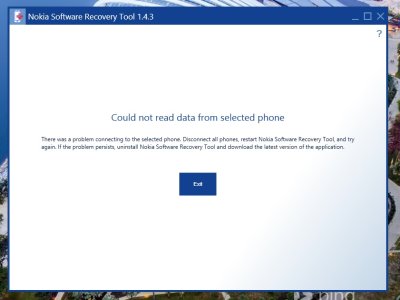
NSR Error.jpg
Samething happening, This is the process i have done
First i uninstall the NSR 1.4.3 and then i restart the system, after that i install the NSR 1.4. again (Phone is not connected to laptop at this time), after successful installation i opened the program NSR 1.4.3, it asks for plugin the phone, so i connected. Again it displays "Could not read data from selected phone).
I have attached the image. Please check.
 
The Recovery Tool cannot undo certain updates, as I found out unfortunately. Maybe the current software on your 820 is keeping it from seeing it?

You may have to wait for an update for the tool itself, unfortunately (I'm just going to sell-off my 925, I've exhausted my patience after the last month and a half).
 
Try this:

Let the program search for your device. Unplug your phone and turn it off. Now hold DOWN (maybe is up, but Im pretty sure is down) and keep holding it. While holding it plug your phone on USB. That worked for me!

sorry for my english
 
I had the same issue with down grading my 925. What worked for me was to remove the the Nokia software tool all together delete any files it left behind and start over, I messed with it for 3 hours before I tried this way. Don't know if it will work for you but it's worth a try.
 
i had the same issue with down grading my 925. What worked for me was to remove the the nokia software tool all together delete any files it left behind and start over, i messed with it for 3 hours before i tried this way. Don't know if it will work for you but it's worth a try.
what was exactly what you did
 
My post?

Don?t plug your phone on USB port. Open nokia software tool and click to search for a phone.
Now shutdown your phone (hold power button + slide down). After that hold the down button (volume) e keep holding it. Plug the phone on USB port while you?re holding the down button and the nokia tool should find your phone.

I?ll try to find the tutorial later.

================================

Ok. I found it:

http://forums.windowscentral.com/wi...re-recovery-tool-help-needed.html#post2666424
Posted by: hope4wp

"ok here's a way, when it says it's waiting for your phone to connect remove your phone from the USB cable and switch it off......press ONLY the Volume "DOWN" button and keep holding it while you plug the USB cable again until you see an exclamation mark! and now it will switch off on its own and show you NOKIA and the phone should get recognized! and if it still doesn't then let me know (you can get out of the nokia screen with a soft reset or a normal reboot)
I'm posting the photo so you know it worked for me!

P.S - it's not the normal "Nokia" which shows on reboot because it's not on the center of the phone.!! "
 
Last edited:
Finally I have found a solution, I used Nokia software updater 4.1.0 instead of Nokia recovery tool. And when I starts Nokia software updater, first it itself check the updates for the newer version of Nokia software updater, after updating, it detects my phone and showed the new software version, and then it directly install Windows 8.1 without downgrading OS to wp8.

This is the firmware number currently in my phone starts with 3051.50009
 
Finally I have found a solution, I used Nokia software updater 4.1.0 instead of Nokia recovery tool. And when I starts Nokia software updater, first it itself check the updates for the newer version of Nokia software updater, after updating, it detects my phone and showed the new software version, and then it directly install Windows 8.1 without downgrading OS to wp8.

This is the firmware number currently in my phone starts with 3051.50009

it's been 3 weeks since this last post but i'd like to thank you man, i did this and it works fine. i tried gazillion times the NSRT way but it didnt work for me. :sweaty:

im rockin' out now my L1020 (Cyan + PfD) :cool:
 
it's been 3 weeks since this last post but i'd like to thank you man, i did this and it works fine. i tried gazillion times the NSRT way but it didnt work for me. :sweaty:

im rockin' out now my L1020 (Cyan + PfD) :cool:
But how?

Where did you download this software? All I found was some weird links in google that installed the nokia suite which does not work.
 
Hi All,

I have installed the latest version of nokia software recovery tool 1.4.3. I want to downgrade my lumia 820 developer preview to win 8 to update lumia cyan. When i plugin to my lap, and started the nokia recovery tool it says couldn't read information from phone. FYI phone is working properly with laptop, i can copy files to the phone.
i am using windows 8.1 in my laptop.

Any help how to downgrade :unhappysweat:
Foe what it's worth, I had a 1520 that started acting up. The store (B&H) said send it back but I asked if they cared if I tried NSRT first just in case its from some windows file corruption. They said knock yourself out. Reflashing didn't solve the problem BUT it did take 5 (maybe more) tries before NSRT decided it recognized the phone. I could also move files back and forth despite NSRT saying it didn't find any phone. I've read others say something similar. So it's POSSIBLE it would eventually recognize the phone if you keep running it over and over.
 
The LSRT software is useless. I have 5.0 version and it won't recognize no matter the strategies used that have been listed. Might be because I have the Preview for Developers on that unlocks it for developer updates to the OS. This was too bad because the phone stopped backing up txt msgs last August, so restoring my account to a new phone caused me to lose months worth of txt msgs and keeps deleting my new ones after a day or so rolling back to the incomplete sync. It's annoying as [insert whatever word(s) you like]. I'd like to make an image of the previous 920 and restore it to the new 920.....assuming this tool even allows for that option. Might break down and get an android eventually since Microsoft/Nokia hasn't produced a new phone that impresses the 920 imo. The whole merger has everything messed up. Even the 930 isn't all that big of a deal in terms of an upgrade, and AT&T doesn't have it anyway.
 
Status
Not open for further replies.

Trending Posts

Forum statistics

Threads
343,213
Messages
2,266,294
Members
428,899
Latest member
Consanguine
