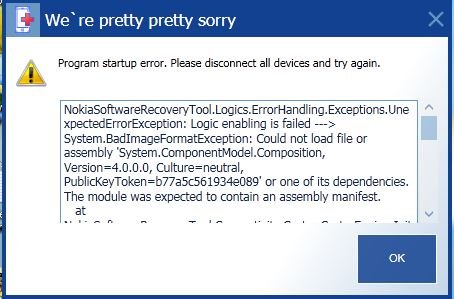
Nokia Software Recovery Tool: what is this 0x80131500 error??

Jcmg62

Active member
Oct 8, 2013
775
27
28
I've search the web and there's a quite a few comments regarding the 0x80131500 error showing up when trying to Flash your phone, but I haven't found any actual solutions to get around the error.

Briefly, I'm using a Lumia 1520 with DP8.1. Cyan has just arrived and I want to flash back to WP8 to get the full 8.1/Cyan OS.

But for two days now, I follow the Software Recovery Tool guide, the software downloads to the tool but the moment it starts the installation process I get the 0x80131500 error.

I've hard reset my phone...twice...no luck

I've unistalled/reinstalled the recovery tool....no change

I've even changed the usb cable I was using to tether the phone to the laptop...no luck

So, short of making a sacrifice to the software gods or chucking my phone against the wall, can anyone suggest a possible fix?

Thanks

JC
 
Are you using your 1520 on a corporate account? If not, you do not have any concerns about BitLocker.
 
Are you using your 1520 on a corporate account? If not, you do not have any concerns about BitLocker.

Hi Laura, thanks for your response. No, I'm not using a corporate phone. I'm on a standard 2 year contract with Vodafone, so the handset is technically "locked" by Vodafone but I wouldn't have thought that would prevent flashing the phone. I used to have a Nokia N900 (awesome phone btw....never went mainstream but awesome) with Vodafone and would flash that every time maemo/meego launched an update, so I'm quite certain Vodafone wouldn't be preventing the flash software from performing.

Do you know what the error come code refers to?

Thanks

John
 
Hi Laura, thanks for your response. No, I'm not using a corporate phone. I'm on a standard 2 year contract with Vodafone, so the handset is technically "locked" by Vodafone but I wouldn't have thought that would prevent flashing the phone. I used to have a Nokia N900 (awesome phone btw....never went mainstream but awesome) with Vodafone and would flash that every time maemo/meego launched an update, so I'm quite certain Vodafone wouldn't be preventing the flash software from performing.

Do you know what the error come code refers to?

Thanks

John
I'm not sure about the error code. However, you do not need to downgrade to WP8 to get the cyan update if you do not have a corporate account. The BitLocker bug only affects corporate accounts. Personal accounts do not use BitLocker encryption on devices.
 
I was experiencing the same problem, but I kept trying until it worked. I didn't do anything, so I don't know what this error could be. However, my 1520 was country variant for the Middle East and Asia region, but Nokia Recovery Tool reset it back to wp8 by flashing it with an O2 GB ROM, with the annoying O2 flash screen on startup and all the O2 crapware
 
I'm not sure about the error code. However, you do not need to downgrade to WP8 to get the cyan update if you do not have a corporate account. The BitLocker bug only affects corporate accounts. Personal accounts do not use BitLocker encryption on devices.

Hi Laura, so if Cyan has indeed arrived in the UK and I'm running 8.1DP all I have to do is wait for the update to arrive on my phone?
 
I'm not sure about the error code. However, you do not need to downgrade to WP8 to get the cyan update if you do not have a corporate account. The BitLocker bug only affects corporate accounts. Personal accounts do not use BitLocker encryption on devices.

Does this mean we 8.1DP users can safely upgrade to cyan without restore(no bit locker or corporate accounts active on my phone)
 
I was facing the same problem while restoring my Lumia1520 using the Nokia Software Recovery tool.
However, it seems your Windows firewall/Anti-virus program may be causing issues. My phone was restored successfully when I turned off both, the firewall and the antivirus program.

Give a try.
 
I couldn't even get the tool to recognise the phone,it just acts as if I've not connected anything,I can even access the storage using windows explorer but can't restore
 
I was facing the same problem while restoring my Lumia1520 using the Nokia Software Recovery tool.
However, it seems your Windows firewall/Anti-virus program may be causing issues. My phone was restored successfully when I turned off both, the firewall and the antivirus program.

Give a try.

Thanks for the tip, I'll give this a try
 
I was facing the same problem while restoring my Lumia1520 using the Nokia Software Recovery tool.
However, it seems your Windows firewall/Anti-virus program may be causing issues. My phone was restored successfully when I turned off both, the firewall and the antivirus program.

Give a try.
Thanks for your solution! This works for me!
 
i somehow got it to recognise under recovery tool,working fine now but im not downgrading unless cyan ota doesnt happen
 
I was experiencing the same problem, but I kept trying until it worked. I didn't do anything, so I don't know what this error could be. However, my 1520 was country variant for the Middle East and Asia region, but Nokia Recovery Tool reset it back to wp8 by flashing it with an O2 GB ROM, with the annoying O2 flash screen on startup and all the O2 crapware
Im in lebanon and i have the same issue!! what did u do about the O2 thing?!!
bcoz now its like its not an UNLOCKED phone!
​the whole purpose was to just be able to get CYAN!
 
Same problem happening with my Lumia 520. While installing firmware this error occurs. Sometimes a message pop up comes saying PRESS VOLUME-DOWN & LOCK KEYS SIMULTANEOUSLY TILL THE PHONE VIBRATES. I did the same but phone reboots itself. Now I'm very much frustrated by this.
 
I have tried all and still the same on my Lumia 822. Nothing is working and my phone is bricked... Where can I open a case with microsoft? Did anyone else get it resolved. I even stopped firewall and antivirus software.
 
See below link post 5 about clean install.
http://forums.windowscentral.com/wi...-nokia-software-recovery-tool-installing.html

I had the same problem, with a Lumia 520. I finally got it to install:
Download the Nokia Software Recovery Tool and install it, but do not run it.
Start MSCONFIG. Change the settings to Clean Boot.
On the General Tab, choose Selective Startup. Uncheck "Load startup items".
On the Services tab, check "Hide all Microsoft services".
Click on "Disable all" button, on the right side. Click OK button.
Restart the computer. You should now be able to finish the install.
Remember to reset MSCONFIG to Normal startup.
 
I am in India... i upgraded my Lumia 520 to WINDOWS 10 TP, but somehow i wanted to downgrade it, so i used Lumia software recovery tool. But after downloading the package, it started disconnecting, and showing the erroe 0x80131500. Package was not installed. i tried everything, but now its not starting, and only a red screen with NOKIA written on is showing...... it is not connecting to the Lumia software recovery tool, neither the device is starting... plzzzzz help me. pllzzz
 
Not at all bro. My phone is still off. I am thinking of visiting my nearest nokia service centre :\
 

Trending Posts

Forum statistics

Threads
343,251
Messages
2,266,332
Members
428,902
Latest member
niedrie