Problem downloading speech language and checking for phone updates

anon(5527120)

New member
Nov 24, 2013
62
0
0
I wanted to download English(India) speech pack for my phone and I went to Settings -> Speech and chose English(India) and my phone says "Downloading language" but it's been going on for 2 days and the download hasn't finished. The file size is not more than 25 MB. I'm using a proper Wi-fi connection. When I tap the English(India) option, it takes me to phone update and when I choose check for updates, the update status is shown as "Checking for updates..." but it never finished checking for updates and every time my phone screen times out I have to check for updates again. I've been preventing my phone screen from timing out for the past half an hour but the phone is neither able to check for updates, and nor is it able to download the speech language pack I want to download. I tried the workaround where you download a keyboard language but even that failed to download... Everything just says "Downloading" or "Checking for updates" but it never finishes.
 
No error message?
Can I ask how much room is on the phones internal storage?
 
Internal storage: 1.68GB free
And yes, no error messages.

I also have the latest OS version (8.0.10521.155) on my phone already and am registered for Preview for Developers program
 
Not sure, yet I think you may need more overhead storage to allow the download package to install.
 
If I bring my free internal memory up to 2GB would that be sufficient? I don't think I free it up beyond that...
 
I'd try a reboot (soft reset) first.
Then see if you can bring the phone memory up as much as you can afford after that.
 
I've noticed that the Viber app on my phone is taking up 96MB although the app itself is only 18MB. Is this because of the app updates? Also, out of only 4GB of internal memory, is it realistic of Microsoft to ask us to keep 2GB free just so that we can download a 25MB speech language pack. I reckon it's gonna be much worse when Cortana comes out (it'll obviously need more than 25MB)
 
I believe the need for so much overhead is because the phone is running apps\services in the background.
Things like OneDrive, Messaging...etc will be caching\writing to phone memory during downloads.
The system may need as much as 1gig to guarantee underlying operations run properly.

The case of having 1.5 gig or so left in memory the download package is compressed and probably inflates to .5 gig to install.
Perhaps the system is detecting low memory then not allowing the download.

The odd thing is your not getting any memory or other error code.
Give the reboot a go and see what happens after.
Certainly worth a try as a low risk solution.
*Note
Make sure the battery is topped up also.
 
Battery is topped. Rebooted the phone and went to speech and it still says "Downloading language". Been like this for two days. Can't even cancel/stop the download
 
It's going to to updates for the phone firmware\OS?

edit:
Is use cellular data enabled for limited wifi under settings\cellular?
 
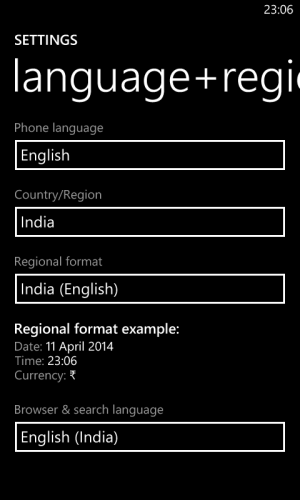
I have a 521 right here and I just changed the language to English from English (US)
I got "Restart Phone" in a box tapped it then the phone went to a quick restart.

Now the language has changed.
 
Weird...

wp_ss_20140411_0002.png

I just changed to India and English.
Same thing.
Restart Box\tap\reboot\language and region changed.
About 25 seconds.
 
I don't have a problem in changing language. I have a problem in downloading the speech language pack for my region. Try going to "speech" and downloading the English(India) language pack.
 
Ah I see...
Just got a notification to download a language pack.
Downloading now.
 
it's almost done...about one more minute maybe...

K
edit
This phone had 4.04 gig free after the download\install it has 3.79 gig.
 

Forum statistics

Threads
342,843
Messages
2,265,922
Members
428,880
Latest member
stoobtnelis